We might start most of our lessons like this, but this time we add extra strength to our voice when we say “this might be the most important photography lesson you’ll learn”.
While all of our lessons are important (from color theory, to manual camera control), this lesson on the basics of composition is arguably the foundation of all good photography. That being said, you need the knowledge gained within the previous lessons to be able to use the information in this lesson with better understanding. You can’t get to step “c” without first understanding “a” and “b”.
Without a solid understanding of the basic rules of composition your photographs may look unorganized, unappealing, accidental or simply too confusing for the eye to comprehend.
Below we’ve listed the various elements of photography composition. While it is not important to fit as many of the elements into one photograph as possible, it is important to know that all of these elements exist. For example, the use of “lines” may not play a primary part in one of your photographs. Maybe your primary focus will be to focus on color and the line element will play a secondary role or possibly even no role at all.
Which elements will play a primary role and which ones will play a secondary role is something you will need to figure out on a photograph by photograph basis.
Primary and secondary elements
Up until this point we have spoken about many different rules of photography. We’ve spoken about creating emphasis, motion and color balance to name a few. Throughout these lessons we are going to continue to give you more practical advice in order for you to increase the photographic quality of your work. However, we don’t want you to get confused and try to incorporate all of these elements into one photograph. To do so would be impossible. In each photograph you will incorporate less than a handful of each of these elements. For example, maybe you find a great shot of a valley in your home city. You use the rule of thirds, focus on using complementary colors and create a nice color highlight by using more of one cool color than the other warm colors in the area. These will be your primary elements. However, maybe in this photograph there is the potential to play with lines and patterns created by the shape of the valley. Maybe these are less noticeable and you don’t want to highlight them in such a way that they become a primary element but you want to include them nonetheless. These would be considered your photographs secondary elements.
Just remember, it’s not a competition to find a way to work each element into your photograph. If you can’t find unique lines or patterns in your shot, don’t worry, it doesn’t need to be included.
Let’s start by talking about the use of lines in your photograph.
Why Are Lines Important in Photography?
Understanding how to use lines in your photography is a great tool for creating stunning images. If you harness the power of lines in photography you can illicit a responses from your photograph viewers. Often this response happens on a subconscious level but it’s still important to know how to use lines in order to achieve your desired response. A good photograph will almost always make use of one kind of line or another. Below are some types of lines in photography and some examples.
Implied Lines
Implied lines are not actual lines that you are used to seeing. They are instead implied in the picture area. They are made by the way objects are placed within the 4 walls of your photograph. Very often an actual object will create a line such as s tree, a railroad track or telephone wires.
Vertical Lines
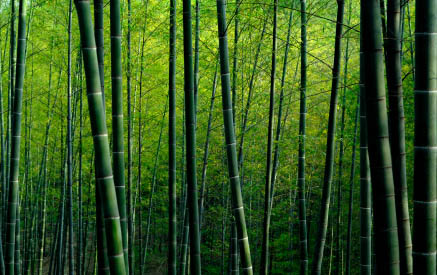
Vertical lines run up and down. They help stimulate feelings of dignity, height, grandeur and strength. You can find vertical lines in buildings, trees, fences, or even people standing up. Look at the following picture and think about your interpretation of the vertical lines in the following forest picture.
Horizontal Lines
Horizontal lines usually denote a repose, a calmness, tranquility and peacefulness. An example would be a person lying in the grass sleeping, flowers in a field, the flatness of a desert scene or lake. You can make your photograph illicit these feelings if you look for them in the picture area and use them in your photographs.

Diagonal Lines
This like gives the sensation of Force, Energy and Motion as seen in trees bent by the wind, a runner at the starting line or the slope of a mountain as it climbs into the sky. By knowing this you can create Force, Energy and Motion with your camera easily by tilting the camera to make objects appear to be in a diagonal line. A dignified church steeple when photographed at a slant will change to a forceful arrow pointing towards the sky and show motion.

Curved Lines
Curved lines are all about beauty and charm. The best example of this would be a beautiful female form with all its lines and curves. Of course there are other examples: The curve in a river or a pathway through a flower garden.
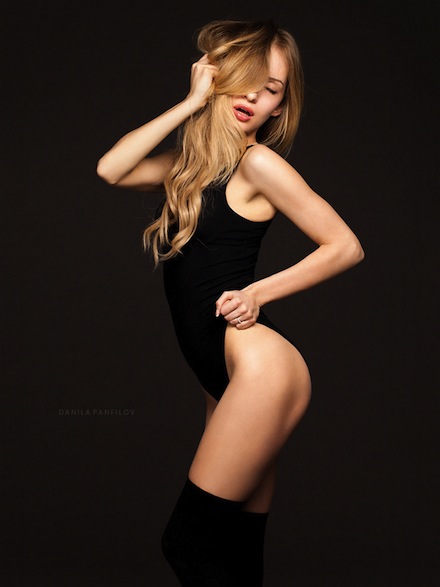
Photo by dp_danny
S Curves
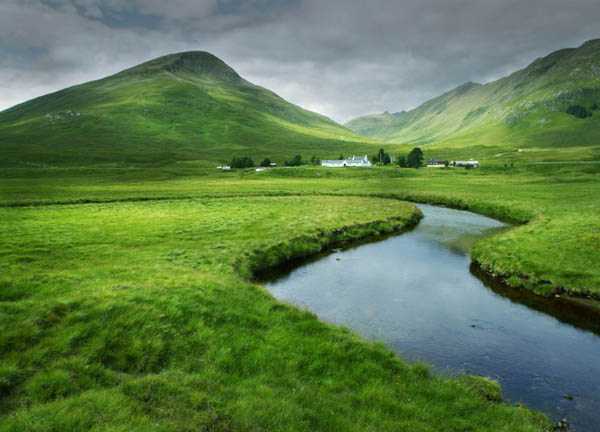
This line goes further than just a plain curved line. It is called the Line of Beauty. It is Elastic, Variable and combines Charm and Strength. It has Perfect Grace and Perfect Balance. You have seen this S Curve hundreds of times in drawings and paintings and other works of art.
Examples: the double curve of a river makes an S curve. A path, row of trees or bushes that curve one way and then the other way create the S curve. Look for this type of design and use it in your photos to add interest and beauty.
Leading Lines
The line that leads your eye in to the picture area easily like a road or fence, a shoreline or river, a row of trees or a pathway. A successful Leading Line will lead your eye in to the picture and take it right to the Main Subject or Center of Interest

An unsuccessful Leading Line will take the eye in to the picture but will ZOOM the eye right OUT of the picture if there is no Stopper to hold the eye in the picture frame; such as a tree, house or other large object on the right hand side of the picture frame which will STOP the eye from going out of the picture. The Center of Interest or Main Subject will act as a Stopper and hold the eye in the picture frame.
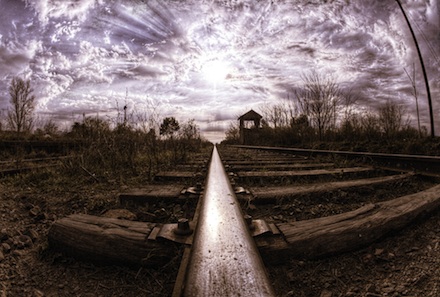
Photo by lrargerich
The best Leading Lines will start at the Lower Left area of the picture frame but not in the exact corner. Again, the eye likes to enter a picture frame at this point and the Leading Line will help it get in to the picture easily and swiftly.
Shape
The way subjects connect to each other in a photo helps form shapes that draw
the eye from subject to subject. If the photo composition lacks shape, then the photo becomes too busy and awkward to appreciate. Some shapes are more effective than others in providing an interesting frame for your photo. For instance, squares and circles tend to be too symmetrical and leave too much empty space around the subjects. The shapes that work best for composition are triangles and diamonds.
Triangles can be formed a few different ways:
If your subject is already triangular or diamond-shaped (like a pyramid), the viewer’s eye will automatically focus on that shape.
Groups of people can be posed as an irregular triangle. This helps keep people from creating a shapeless blob in a portrait and an irregular (slanted) triangle makes sure that no two pairs of eyes will lie on the same horizontal plane.
Different landmarks can be one of three points that form the triangle. For instance, a person at the forefront of the photo is the first point, a boat far behind the person forms the second point, and an island on the other side of the frame forms the third point. As long as no other objects enter the frame, the eye can easily follow the photo from the person, to the boat, to the island.
Also, a diagonal line can divide the photo in two, creating two contrasting triangular sides. This stresses the difference between the two sides. For instance, if you allow a fence to bisect your frame on the diagonal, the boundary between the busy highway on one side and the lazy, green pastures on the other is emphasized.
Moving your objects around until you find these pleasing shapes enables you to add dramatic effects to subjects that would otherwise be seen as ordinary.
Form / Light and Dark
When a photograph’s light is exaggerated to the bright end of the spectrum, it is called “high key” photography. When it is slanted to the dark end of the spectrum it is called “low key” photography.
High key photography is often used to portray a delicate or feminine intention. A white on white photograph stimulates the mind into thinking about the innocence of youth and the fabric of dreams.
Low key photographs on the other hand highlight the dark elements within a photograph. If high key photography is referred to as “white on white” then low key photography can be referred to as “black on black”. There are varying degrees to which you can make a photograph a low key photo. If you were doing a portrait you could simply find the darkest room possible and highlight only the eyes. Alternatively you can keep most of the body visible but very dimly lit. In both cases the overall feeling will be much more mysterious than a high key photograph. In low key photography you will evoke feelings of mystery, night and secrets. In low key photography, silhouette and shape prevail over color and light. Below is an example of a low key photograph.
Dominance and Subordination
As we’ve spoke about earlier and will continue to lecture about throughout these lessons, the process of simplification is important. Dominance is the aspect of composition which brings out your main area or subject of interest while subordination has to do with ensuring less important elements are either dulled down or eliminated.
You need to understand that some photographic elements may need to be dulled but not removed while others should be removed all together. How do you choose which ones will stay and which ones will go? Easy, you have to ask yourself if the object supports your main subject and theme. For example, if you are taking a picture of a prisoner in jail, their bed in the background, the bars of their cell and their small window are all secondary elements which help tell your story. These elements shouldn’t be eliminated but should be dulled down. They help tell your story and they provide context. If you just took a picture of a desperate looking man you would loose the story of your photography. You need the cell bars, the small window and poor excuse for a bed in the background to provide a ‘set’ or ‘context’ for your picture. Maybe you change your aperture to blur them out a little bit but not so much that they become unrecognizable. Their purpose is to provide context to the shot without overpowering or “upstaging” the main element, which in this case is the actual prisoner. Other elements may also exist in the picture as well. There might be a laundry hamper in the background or cleaning personal in the cell as you are going to take the picture. If these things are not an important part of the story you’re trying to tell then frame your picture in such a way that eliminates them, or wait for the scene to change. Every element which makes it into your photograph must play a primary (main) role or a secondary role (provides context and enhances the story).
Pattern
Pattern in photography is achieved through shapes or lines which repeat themselves. Pattern is often used as a secondary element within most photography but can be found as a primary element within some forms of abstract photography. Below is a good example of the use of pattern in photography.
Balance
Balance in photography can be achieved in different ways. As discussed earlier, it can be achieved through color balance or the weight of objects as well as through the positioning of objects.
There are two types of balance in photography. There is formal balance and informal balance. Formal balance in photography is often quite boring to look at. Imagine a headshot or portrait that could be folded in half and virtually identical on either side. The left side would have one eye, half a nose, half a mouth and half the hair. The right side would simply mimic the left side. Things which are fairly symmetrical (people, cars, plants etc) can be shot using formal balance.
However, most things have asymmetrical attributes meaning formal balance isn’t achievable. This isn’t to say that your picture won’t have a sense of balance, it will just have a sense of informal balance instead.
Example of formal balance
Reflection
Using reflection is a great way to add creativity to your composition. You can find a reflection in any reflective surface such as a mirror, metal objects, glass objects, puddles, lakes or glossy surfaces.
Reflection not only adds a unique look to your photograph but it also adds weight. Imagine a mountain in a photograph. A mountain is already a very heavy object and will be regarded as such by viewers. However, you can effectively double the weight of a mountain by taking its picture when it’s behind a lake with its reflection in it. The reflection of the mountains make the mountain take up twice as much room in the photograph ensuring that its position in the photograph is the main focus.
Look at the following example of how you can use reflection to add weight to an object.
However, all you need is a puddle or reflective surface to achieve the same results. Look at the picture below to see an example of how to use reflection in everyday objects.
<img loading="lazy" decoding="async" width="960" height="640" class="alignnone size-full wp-image-27843" src="https://photographyicon.com/wp-content/uploads/2012/10/example-of-negative-space-in-photography-icon-photography-school-960.jpg" alt="example of negative space in photography – icon photography school 960″ width=”960″ height=”640″>
Photo by Trevor King

Photo by Sookie
Negative space is the space within a photograph which is left unused. Negative space is a great way to help add emphasis to your main subject. Negative space is generally just one color (or black or white) and takes up a fairly large portion of a photograph. Using a simple background such as a clear sky or a white table are two good examples of areas which could produce negative space.
Negative space doesn’t need to be a solid color however. Negative space can also be a textured surface with various degrees of detail.
Rule of Thirds and the Golden Ratio
The rule of thirds and the golden ratio (also referred to as the golden mean) are two of the backbone subjects to composition. They are easy to manipulate by simply changing your position and focus, making it easy for beginner photographers to implement into their photographs and they have a dramatic impact on the outcome of your final shots.
To understand the rule of thirds you need to break your photograph down into three horizontal parts and three vertical parts which will create nine separate boxes.
Studies show that the human eye doesn’t like to rest on objects in the center of a photograph. It is more natural for our eyes to rest off to one of the intersecting lines on the rule of thirds grid. By placing your main objects of interest at these positions, you will allow your viewers eye to rest comfortably instead of fighting against a center placed element.
Notice how this photographer put both of his characters close to the intersecting points of this photograph. This photograph is much more natural for the human eye to look at than if this photograph was composed with the farmer placed dead center in the middle. You’ll also notice how the horizon line was placed along the top 1/3rd of the photograph.
This is another rule when it comes to the rule of thirds. When shooting a landscape photograph you should always place the horizon either one third of the way up the picture or one third of the way down the picture. Placing the horizon dead center in the middle is less appealing and less natural for the eye to look at. When deciding where to place your horizon line you usually only have to ask yourself one easy question: Which is more interesting the sky or the ground? In this case what is happening on the ground is more interesting then the sky, therefore the ground takes up 2/3rds of the picture the sky takes up 1/3rd .
If however you were out on a lake and the cloud formations where stunning, while the water was the less interesting element, you could simply reverse your horizon line and place the sky so that it takes up 2/3rds of the photograph and the water would only take up 1/3rd.
Generally speaking the main subject of interest can be placed at one of the intersecting points. Knowing that you can then place the horizon accordingly.
Some argue that the rule of thirds is simply a simplification of an even more advanced mathematical equation known as the golden ratio. the golden ratio is a ratio which has continued to surprise artists, scientists, musicians and mathematicians for centuries. The reason being is that the golden ratio seems to pop up everywhere. Not only does the golden ratio pop up all over the place, it also seems that the human eye is very attracted to the results of the ratio.
For example, there are certain measurements on models faces which equal surprisingly close to the golden ratio. In nature we see the golden ratio in plants and the branching of trees, the spirals of shells, the curves of waves, in our DNA and the solar system. It has also been used in architecture, art and music. the golden ratio seems to be everywhere. When you hear artists refer to the mathematics of design or the mathematics of art, they are often referring to the golden ratio.
It was used in architectural masterpieces such as the Greek Parthenon, the Pyramids and later in such great works of art such as Notre Dame in Paris. There is also cause to believe that it was used by the great artists Michelangelo and Leonardo De Vinci.
It is debated as to whether the Mona Lisa was intentionally created using the proportions of the golden ratio.
What is The Golden Ratio?
Simply put, the golden ratio is a ratio of approximately 1.618 to 1. This proportion creates a sense of harmony and balance and has been proven to be one of the elements that viewers like to see in art. When we look at a photograph and we say “I like it”, but are unsure why, the golden ratio and the mathematics of the composition are often one reason behind our knee-jerk reaction to look favorably on a work of art.
Although this ratio has been rediscovered throughout time, one undisputed milestone in its history was the Fibonacci number series. In the 12th century Fibonacci produced a series of numbers by adding together pairs of numbers.
0, 1, 1, 2, 3, 5, 8, 13, 21, 34, 55, 89, 144,
(0+1=1, 1+1=2, 1+2=3, 2+3=5, 3+5=8)
The ratio between each successive pair gets closer and closer to Phi as you progress through the series.
Once you start splitting a golden rectangle by the ratio, you can keep sub-splitting it down forever. The spiral this produces exactly matches the growth of the Nautilus shell in nature. Yes, it’s all getting a little freaky now.
Examples of the golden ratio in Art
As stated above you can see examples of the golden rule in art and architecture as well. Below are some examples to help you see the golden ratio in practice.
You can see the golden ratio used with great accuracy in the Greek Parthenon above. When people discovered this ‘divine proportion’ then realized what power and beauty it had and would try however possible to fit it into their works of art.
A great example of the golden ratio in photography was created by Cartier-Bresson who used the proportions of the Golden Rectangle to form his composition. There is no mistaking the golden ratio in the photograph below.
Complexity vs. Simplicity
the golden ratio is another tool you can use to ensure you stimulate the “I like it” response from your viewers. It is a simplification and beautification tool. We will now spend some more time discussing other simplification tools.
In our experience teaching this course, the single biggest mistake amateur photographers make is unnecessarily complicating an image. Many photographers get preoccupied with their main subject and ignore the other elements within the four walls of the photograph. The results are often disappointing. In order to fix this problem you must realize that it is just as important to consider EVERY element that makes it into the four walls of your photograph as it is to consider your main subject. Nothing should be in your photograph by mistake.
Every element of your photograph should look planned. It’s as important to know what to leave out of your framing as it is to know what to include. If you have distracting background elements they will only weaken the overall effect of your picture. Try repositioning yourself, zooming in closer or changing your perspective to do away with unnecessary foreground and background elements. You don’t want your photographs to appear cluttered or unorganized. You want your viewer’s eyes to be able to wander through your photographs with ease. Look at these examples of common cluttering mistakes in the photographs below. Does this mistake look familiar in your own photographs?
Amputation
Amputation is another very common mistake of amateur photographers. Amputation occurs when you cut a portion of something off with one of the walls of your photograph. It’s the result of not paying enough attention to what makes it inside the four walls of your photograph and what stays out. If you are too focused on your picture’s main subject you may lose focus on other important details surrounding your main object.
Amputation shows that the person standing behind the camera was not focused on the photograph as a whole and focused only on the main subject. You can tell because they include parts of objects rather than including the entire thing or leaving the entire thing out. They may accidentally include 10%, 50% or 90% of the element, but it still appears cut off to the viewer. You will notice when you are looking at professional photography, that there is very rarely any amputations. If there is any Amputation it will be strategically placed and actually add to the photograph as a whole. Look at the photo below to see an example of a common Amputation mistake.
Notice in the previous picture that the photographer was so interested in taking a photo of the back muscles of a Rodin sculpture that they neglected to pay attention to what was happening around the edges of the photograph. Notice off to the left hand side the other group of sculptures had their heads cut off by the left wall of the photograph. Remember, as a photographer you need to ask yourself the following question again and again.
“What am I going to allow within the four walls of my photograph and what am I going to make sure I don’t let in to my photograph?
In the last example the photographer never asked themselves this question. When this happens you often get chaos and disorganization in the background and around the edges. If you have to “amputate” a part of an object, you better make sure that it’s well thought out and appropriate.
When you take your next round of photographs pay extra attention to details around the edges. You’ll notice you may need to reposition yourself, re-focus or change your depth of field to help create a non-distracting, well thought out photograph. Don’t simply point and click at your main subject with disinterest in the surrounding environment. It is likely the biggest mistake amateur photographers make. You can quickly better the outcome of your work by paying extra attention to the details around the edges of your photographs.
Viewpoint and Perspective
Two of the easiest things to change which have dramatic effects on your photographs are your viewpoint and your camera’s perspective. Most amateur photographers only think of taking pictures from one viewpoint. They stand there, hold their camera and click. However, once you get comfortable changing your position and the camera’s position you can create some stunning photographs. Look at the following picture for example and see how a simple camera turn can dramatically change the look and feel of the photograph.
This is an often overlooked composition element.
Secondly most people stand there and take pictures from their current height. This is a natural viewpoint and we all see the world from this perspective. However, it can add a touch of originality to your work if you change your physical perspective. What about getting up higher or bending down. Changing your viewpoint can often add drama and excitement to your photographs.
High Viewpoint
High viewpoints and high camera angles help orient the viewer, because they show relationships among all elements within the picture area and produce a psychological effect by minimizing the apparent strength or size of the subject. Depending on the time of day and the angle of the light, they can also create abstract or flat looking images.
Low Viewpoint
Low viewpoints tend to lend strength and dominance to a picture. It also dramatizes the subject giving it a “larger than life” feeling by creating an illusion that the object is bigger than it is. Another great benefit to low viewpoint photographs is that because the camera is often pointed upwards it removes many distracting background elements and gives room for more simplistic backgrounds (i.e. ceiling, sky, wall etc).