Complementary colors are pairs of colors that sit opposite each other on the color wheel, such as blue and orange. In photography, putting a pair of complementary colors together creates the strongest color contrast you can get: each color makes the other look brighter and more saturated, so the eye goes straight to where they meet. A yellow flower against a blue sky, a warm lit window in a blue dusk street and orange skin tones against a teal background all work this way.
Complementary colors vs contrasting colors
Complementary colors are one kind of contrasting color. “Contrasting colors” is the broad term for any colors that look strongly different from each other: far apart on the color wheel, warm against cool, or light against dark. “Complementary” is the precise term for the one pair that is directly opposite on the wheel, which gives the most contrast of hue possible. So all complementary pairs are contrasting, but many contrasting combinations, such as red and blue, are not complementary.
Which colors are complementary?
The answer depends on which color wheel you use, and photographers meet two of them.
The painter’s wheel (red, yellow, blue)
The traditional wheel taught in art class is built on red, yellow and blue as primary colors. Its complementary pairs are:
- Red and green
- Blue and orange
- Yellow and purple
- Between them, pairs such as yellow green and red purple, or blue green and orange red

This wheel describes how paints and inks mix, and it is still the one most people mean when they talk about color in art and design.
The light wheel (red, green, blue)
Cameras, screens and editing software work with light, which mixes differently. Its primaries are red, green and blue, and its complementary pairs are:
- Red and cyan
- Green and magenta
- Blue and yellow
Mix two complementary lights and you get white or neutral gray; mix two complementary paints and you get a muddy brown. You use the light wheel every time you edit: the temperature slider in white balance runs from blue to yellow, and the tint slider from green to magenta. Each slider moves along one complementary pair, which is why adding one color removes its opposite.
For composing pictures the two wheels mostly agree in spirit. Blue against orange or yellow, and green against red or magenta, read as strong opposites either way. Where they disagree (is yellow’s opposite purple or blue?), trust what you see: if two colors look like they push against each other, the contrast works.
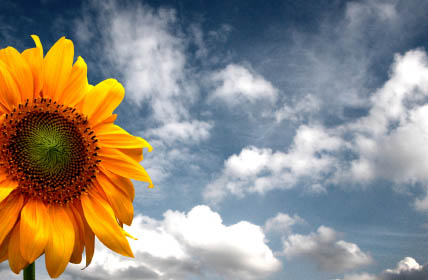
The sunflower above is a simple example. Yellow and blue are opposites on the light wheel, so the flower jumps forward from the sky.
Want the whole wheel explained? The color wheel page covers primary, secondary and tertiary colors and the other color schemes built on it.
Why complementary colors work in a photograph
- They make each other look stronger. Placed side by side, opposite colors look more saturated and vivid than either does alone. This effect, called simultaneous contrast, is why a red jacket in a green field looks so intense.
- They separate subject from background. When the subject is one color and the background its complement, the subject stands out even when the light is flat and there is little tonal contrast.
- They feel balanced. A complementary pair covers both warm and cool sides of the wheel, so the picture feels complete rather than one-sided.
- They create depth. Warm colors such as orange tend to seem to come forward and cool colors such as blue to fall back, so a warm subject against a cool background looks more separated in space.
Where to find complementary colors
You do not have to stage them. Once you start looking, complementary pairs are everywhere:
- Golden hour and blue hour. Low sun lights things warm orange, while shadows are lit by the blue sky. A street at blue hour with warm windows and streetlights gives the classic orange and blue pair. See golden hour photography for the warm side.
- Nature. Red berries or flowers among green leaves, yellow flowers against a blue sky, orange autumn leaves on blue water, purple flowers in yellow grass.
- People. Skin tones sit in the orange range, so a blue or teal background, sky or piece of clothing sets a face off strongly. This is the reason for the teal and orange look common in films.
- Cities. Painted doors and walls, shop signs, cars, umbrellas and clothing. Look for one bright object in a field of its complement.
- Mixed light. Warm indoor lamps against cool daylight, or sodium streetlights against a twilight sky.
How to use complementary colors well
Let one color lead
Equal amounts of two strong opposites fight each other. Pictures usually work better when one color fills most of the frame and its complement appears in a smaller area, often on the subject: a small orange figure in a large blue scene, one red flower in a field of green. The small accent then becomes the point of focus.
Control saturation
Two fully saturated opposites can look harsh or garish. Muted versions, such as a dusty blue with a soft peach, still give contrast but feel calmer. The saturation of each color is as much a choice as the hue.
Simplify the frame
Complementary contrast works best when those two colors are the only strong ones in the picture. Move until other bright colors are out of frame, use a longer lens to narrow the background, or shoot from a lower or higher angle to change what sits behind the subject. It is the same idea as simplicity in composition: fewer colors, stronger picture.
Expose for the colors
Overexposure washes colors toward white and underexposure turns them muddy. Expose so the main colors keep their depth, which often means a little darker than the camera suggests in bright scenes.
Set white balance on purpose
Auto white balance can neutralize the warm and cool contrast you were after, for example by cooling a golden sunset. Set a fixed white balance such as daylight, or shoot raw and set it while editing, so the warm light stays warm and the blue shadows stay blue.
Getting odd colors from auto white balance? White balance explains the presets, custom settings and how to set it after the fact from a raw file.
Adding complementary color while editing
Editing lets you strengthen a pair that is already in the picture. Common approaches:
- Split toning, which pushes the highlights toward one hue and the shadows toward its opposite, such as warm highlights and cool shadows. See split toning.
- Color grading, which does the same with separate control of shadows, midtones and highlights. See color grading.
- Adjusting individual hues, for example deepening the blue of a sky and the orange of the subject, while lowering the saturation of colors that distract.
Keep skin looking like skin. Push a teal and orange grade too far and faces turn orange and shadows turn green.
Want to grade a whole set of photos toward a pair of colors? Color grading covers the shadows, midtones and highlights controls and how to keep skin natural.
Other color schemes to know
- Split complementary: one color plus the two on either side of its complement, for example blue with yellow orange and red orange. Strong contrast, but softer than a direct pair.
- Triadic: three colors evenly spaced around the wheel, such as red, yellow and blue. Lively, and hard to keep balanced.
- Analogous: neighbors on the wheel, such as yellow, orange and red. Calm and harmonious, the opposite of complementary.
- Monochromatic: one hue in different lightness and saturation.
Prefer a calmer palette? Analogous colors shows how neighboring hues build quiet, harmonious pictures.
Common mistakes
- Splitting the frame half and half. Equal areas of both colors compete. Let one dominate.
- Too many other colors. A third or fourth strong color dilutes the pair. Simplify the frame.
- Pushing saturation to the limit. Complementary pairs are already intense; maximum saturation looks artificial.
- Letting auto white balance flatten warm light. Fix white balance when the color contrast comes from the light itself.
Try this
Pick one complementary pair, such as blue and orange, and spend ten minutes photographing only scenes that contain it. Aim for a small area of one color inside a large area of the other. Then look at the results side by side and notice which proportions and saturation levels make the subject jump out most.
Frequently asked questions
What are complementary colors in photography?
They are pairs of colors opposite each other on the color wheel, such as blue and orange or red and green. Placed together in a photograph they create strong color contrast and make each other look more vivid.
Is complementary the same as contrasting?
Not exactly. Contrasting colors are any colors that look strongly different; complementary colors are the specific pair directly opposite each other on the wheel, which gives the greatest contrast of hue.
What is the complementary color of blue?
On the painter’s wheel it is orange; on the light wheel used by cameras and screens it is yellow. In practice, both orange and yellow make blue look strongest.
Why is teal and orange so common?
Skin tones fall in the orange range, and teal is roughly opposite orange. Pushing backgrounds and shadows toward teal makes faces stand out while keeping them a natural color.