Product photography is one of the most commercially valuable skills a photographer can develop. Every product sold online needs images, and those images directly determine whether someone clicks “add to cart” or keeps scrolling. For more, see our car photography guide. Great product photography makes an item look exactly as good in a browser as it does in person, and often better. Whether you are shooting for your own e-commerce store, building a freelance business, or working in-house for a brand, this guide covers everything you need to know: equipment, camera settings, lighting setups, backgrounds, styling, and the editing workflow that turns raw captures into sales-driving images.
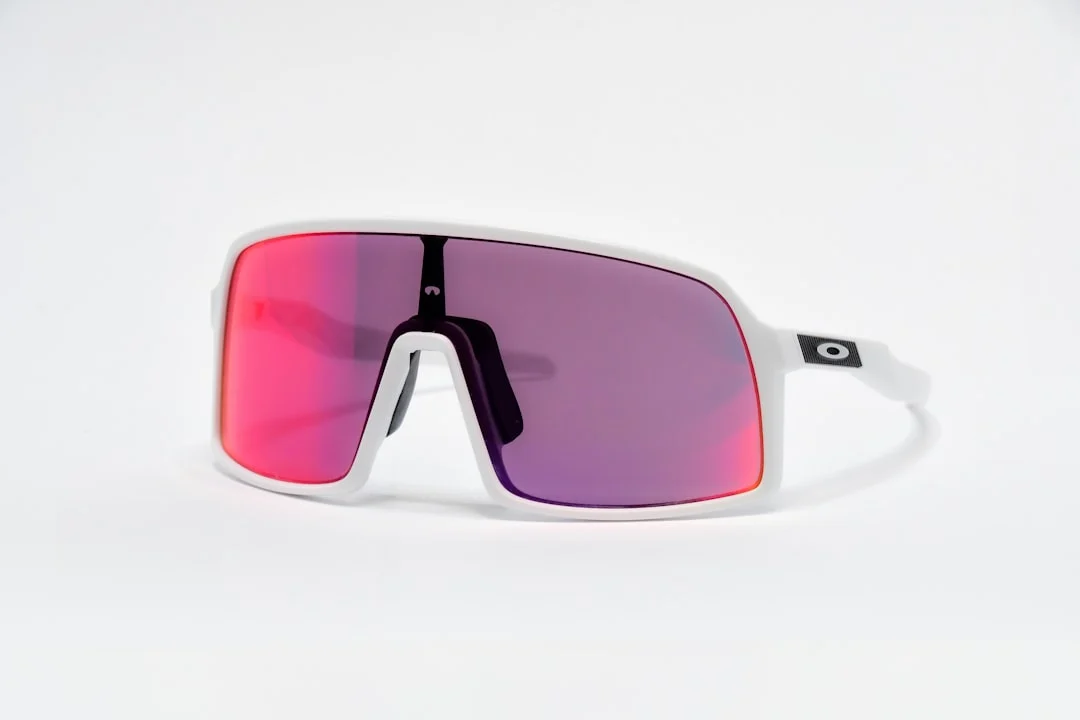
Essential Equipment for Product Photography
You do not need a massive studio budget to produce professional product images. Check out our DIY product photography for more details. A surprisingly small amount of gear, used well, can deliver results that compete with high-end commercial studios. Here is what you actually need to get started, and what you can add later as your work grows.
Camera and Lens
Any modern mirrorless or DSLR camera with manual controls will work for product photography. Resolution matters here more than in many genres, clients may need to crop images or zoom into details on a product listing page, so 24 megapixels or more is ideal. Full-frame cameras have a slight edge for their dynamic range, but crop sensor cameras produce outstanding product images when paired with the right lens.
For lenses, a macro or close-focusing lens in the 50-100mm range is the workhorse of product photography. A 50mm prime works well for larger products, while a dedicated macro lens (90mm or 100mm) lets you capture fine details like stitching on leather goods, texture on jewelry, or the label on a bottle. Avoid wide-angle lenses, they distort product proportions, making edges look stretched and shapes look unnatural. A focal length between 50mm and 100mm keeps lines straight and proportions accurate.
Tripod
A sturdy tripod is non-negotiable for product photography. You will be shooting at small apertures for maximum sharpness, which means slower shutter speeds that demand a stable platform. A tripod also ensures consistency, when you are shooting 50 products in a session and need identical framing, a locked-down camera position saves enormous time. Look for a tripod with a center column that can be positioned horizontally for overhead flatlay shots, or invest in a dedicated overhead arm if flatlay work is a significant part of your business.
Lighting
Lighting is the single biggest factor in product photography quality. You have two main options: continuous lighting and strobe/flash lighting. Continuous LED panels are beginner-friendly because you can see exactly how the light falls on the product before you press the shutter. Strobes are more powerful, produce more consistent color, and freeze any motion, but they require more experience to use well because you cannot see the final result until you take the shot.
At minimum, start with one good light source and a softbox or shoot-through umbrella to diffuse it. A single, well-placed light with a reflector on the opposite side to fill shadows is enough to photograph most products professionally. As you advance, a two-light or three-light setup gives you more control over highlights, shadows, and background illumination.
Backgrounds and Surfaces
A clean white background is the industry standard for e-commerce product shots, Amazon, Etsy, Shopify, and most marketplaces require or strongly prefer it. You can achieve this with a white seamless paper roll, a white acrylic sheet (which creates a natural reflection), or a simple white foam board curved to create a seamless sweep. For lifestyle product shots, surfaces like wood, marble, linen, and slate add texture and context. Build a small collection of background surfaces and you will have options for every product category.
Camera Settings for Product Photography
Product photography demands maximum sharpness and accurate color. Your camera settings should be optimized for detail, not creative blur.
Aperture: Shoot between f/8 and f/11 for the sharpest results across the entire product. This aperture range hits the optical sweet spot of most lenses, delivering edge-to-edge sharpness. Avoid going narrower than f/16, where diffraction begins to soften the image. Only use wider apertures like f/2.8 or f/4 for deliberate selective-focus lifestyle shots where you want a blurred background.
ISO: Keep your ISO at 100 (or your camera’s base ISO) for the cleanest possible files with maximum dynamic range. Since you are working on a tripod with controlled lighting, there is no reason to raise the ISO.
Shutter speed: With a tripod and base ISO, your shutter speed will depend on your lighting power. It might be anywhere from 1/125s with strobes to several seconds with ambient light. Use a remote shutter release or your camera’s self-timer to avoid vibration.
White balance: Set your white balance manually or use a gray card to ensure accurate color reproduction. Auto white balance can shift between shots, creating inconsistencies that are painful to correct in editing. A custom white balance calibrated to your specific lighting setup saves hours of post-processing time.
File format: Always shoot in RAW. Product images often need precise color and exposure adjustments in post-processing, and RAW files preserve far more data than JPEGs for this work.
One-Light Setup: Where to Start
A single light with a modifier is the foundation of product photography lighting. Position a softbox or shoot-through umbrella at roughly 45 degrees to the side and slightly above the product. This creates a natural-looking light with defined shadows that give the product dimension and shape. On the opposite side, place a white reflector card or foam board to bounce light back into the shadows, reducing contrast to a level that looks clean and commercial.
The size of your light modifier relative to the product determines how soft or hard the shadows are. A large softbox close to a small product produces very soft, nearly shadowless light, ideal for jewelry, cosmetics, and products with fine detail. Pulling the light further away or using a smaller modifier creates harder, more defined shadows that emphasize texture and shape, better for products like tools, electronics, or footwear where you want to convey ruggedness.
Start by moving the light around your product and observing how the shadows shift. There is no single correct position, the best angle depends on the product’s shape, material, and the mood you want to create. But the 45-degree starting point works in the majority of situations and gives you a reliable baseline.
Two-Light Setup: Adding Control
Adding a second light gives you independent control over the background and the fill side. The most common two-light configuration for product photography places the main (key) light at 45 degrees to the product and the second light behind the product aimed at the background. This background light lets you blow the background to pure white without overexposing the product itself, critical for achieving the clean white look that e-commerce platforms demand.
An alternative two-light approach uses the second light as a rim or hair light, positioned behind and above the product, aimed back toward the camera. This creates a bright edge along the product’s outline that separates it from the background and adds a sense of dimension. Rim lighting is especially effective for dark products that might otherwise merge into a dark background, and for bottles or glassware where the edge highlight defines the shape.
Achieving a Pure White Background
A pure white background (RGB 255, 255, 255) is required by Amazon and preferred by most e-commerce platforms. Getting it right in-camera saves significant editing time. The technique requires overexposing the background by about 1 to 1.5 stops relative to the product. If you are using a dedicated background light, this is straightforward, simply increase the power of the background light until it reads pure white on your histogram without spilling onto the product.
If you are working with a single light, you can achieve a white background by placing the product on a white surface far enough forward that the background receives less light and can be pushed to white in post-processing. Alternatively, a light tent or shooting table with translucent white acrylic allows light to pass through from behind, naturally creating a bright, even background.
In post-processing, use the curves or levels tool to push any near-white areas to pure white, taking care not to clip detail on the product edges. Lightroom’s brush tool or Photoshop’s pen tool and layer mask technique give you precise control over where the background ends and the product begins.
Lifestyle Product Photography
While clean white background shots are essential for product listings, lifestyle images tell the story of how a product is used and help the customer imagine owning it. A coffee mug on a white background is informational. That same mug on a wooden table next to a book with steam rising and morning light streaming in is aspirational. Both types of images serve critical roles in driving sales.
For lifestyle product photography, think about context and mood. Who is the target customer? Where and how do they use this product? A skincare product might be styled on a marble vanity with eucalyptus sprigs and a soft towel. A power drill might be photographed on a workbench with sawdust and a partially built project. Props should support the product without competing for attention, the product must remain the clear hero of the image.
Natural light from a window works beautifully for lifestyle product shots. Position the product near a large window for soft, directional light that feels authentic. A reflector opposite the window fills shadows gently. Shoot at a wider aperture (f/2.8 to f/4) to introduce selective focus that separates the product from its environment while keeping the product itself sharp.
Flatlay Photography
Flat lay photography, shooting directly from above, has become a dominant format on social media and e-commerce, especially for fashion accessories, food, stationery, cosmetics, and small products. The overhead perspective eliminates background distractions entirely and lets you create highly curated arrangements that tell a visual story.
The key to successful flatlays is deliberate arrangement. Place your hero product first, then build outward with supporting props, creating visual flow through the frame using principles from composition, rule of thirds, negative space, diagonal lines, and grouping in odd numbers. Leave breathing room between elements. Avoid clutter.
For overhead shooting, you need either a tripod with a horizontal center column or a dedicated overhead rig. Handheld overhead shots are nearly impossible to keep level and consistent. Use your camera’s level indicator to ensure the sensor plane is perfectly parallel to the surface below. Even a slight tilt creates a noticeable perspective shift that makes products look oddly angled.
Photographing Reflective and Transparent Products
Reflective products, jewelry, watches, chrome appliances, sunglasses, polished metal, are among the most challenging subjects in product photography. Every surface acts as a mirror, reflecting your lights, camera, tripod, and even you. The solution is to light the environment rather than the product. Instead of pointing lights at a reflective object, surround it with large, diffused white surfaces that create clean, even reflections. A shooting tent or a large softbox positioned very close works by giving the product a smooth, bright surface to reflect instead of a cluttered studio.
Transparent products, glass bottles, clear containers, translucent materials, present a different challenge. They transmit light rather than reflecting it, so front lighting makes them look flat and lifeless. The solution is backlighting: place a light behind the transparent product with diffusion material between the light and the product. This creates a bright glow that reveals the product’s shape, color, and contents. A strip of black card on each side of a backlit glass product defines its edges and prevents it from disappearing into the bright background.
Both reflective and transparent products benefit from patience and experimentation. Small adjustments in light position create dramatic changes in the result. Flag off unwanted reflections with black cards, and use small accent lights to add highlights exactly where you want them.
Editing Workflow for Product Images
A consistent editing workflow ensures that every product image meets the same quality standard, which is critical when shooting product lines with dozens or hundreds of SKUs. Here is a reliable sequence:
- White balance correction. Adjust to ensure the product color is perfectly accurate. Compare the image to the physical product on a color-calibrated monitor.
- Exposure and contrast. Set overall brightness to match the product’s appearance. Product images should be bright and clean but not overexposed.
- Background cleanup. Push the background to pure white (or your desired background tone). Remove any dust, marks, or imperfections on the surface.
- Lens correction. Apply lens profile corrections to remove distortion and vignetting. Straight lines on products must remain straight.
- Sharpening. Apply moderate sharpening focused on the product details. Over-sharpening creates ugly halos, for product photography, subtle and precise is better.
- Retouching. Remove dust specks, scratches, or small imperfections on the product itself. Clone and heal tools in Lightroom or Photoshop handle this well.
- Crop and resize. Crop to the required aspect ratio and resize to the dimensions specified by the platform (typically 1600px to 2000px on the longest side for e-commerce).
Creating presets or Photoshop actions for your standard adjustments speeds up batch processing enormously. When shooting a large product catalog, efficiency in post-processing is the difference between a profitable shoot and one that eats all your margin.
E-Commerce Image Requirements
Each platform has specific image requirements. Meeting these requirements prevents your listings from being suppressed or rejected.
Amazon: Main image must have a pure white background (RGB 255,255,255). Product must fill at least 85% of the frame. Minimum 1600 pixels on the longest side for zoom functionality. No text, logos, or watermarks on the main image. JPEG format, sRGB color space.
Etsy: Recommends a minimum of 2000 pixels on the shortest side. Allows lifestyle images as the main image (unlike Amazon). Supports a variety of aspect ratios but recommends 4:3 for optimal display. Up to 10 images per listing.
Shopify: Recommends square (1:1) images at 2048×2048 pixels for consistent gallery display. Supports any aspect ratio but products will appear inconsistent in grid views if ratios vary. Optimize file size for fast page loading without sacrificing quality, aim for under 500KB per image.
Regardless of platform, deliver multiple angles of each product: front, back, side, detail close-ups, and at least one lifestyle or in-use image. The more visual information a customer has, the fewer returns you will deal with, and the higher your conversion rate.
DIY Home Studio vs Professional Setup
A DIY product photography setup can be assembled for a few hundred dollars and produce excellent results. A folding table near a large window, a sheet of white poster board curved into a sweep, a reflector, and your camera on a tripod is enough to photograph most small-to-medium products. Add a single LED panel or speedlight with a softbox and you have a setup capable of professional-quality work.
A professional studio setup, dedicated space, multiple strobes, various modifiers, shooting tables, tethered capture, and color-calibrated monitors, becomes necessary when volume and consistency demand it. If you are photographing 100+ products per week or shooting for brands with exacting standards, the investment in professional equipment pays for itself through speed and reliability.
The key insight is that lighting knowledge matters far more than equipment cost. A photographer who understands how to shape light with a single inexpensive softbox will produce better results than someone with a room full of expensive gear and no understanding of light direction, quality, and contrast ratios. Start simple, master the fundamentals, and invest in more equipment as your skills and client demands grow.
Common Product Photography Mistakes
- Inconsistent lighting across a product line. If images for the same product collection look different in tone, brightness, or shadow direction, the listing looks unprofessional. Lock down your setup and use the same settings for every shot in a series.
- Inaccurate color. A customer who receives a product that looks different from the listing photo will return it. Calibrate your monitor and match your white balance to the actual product.
- Not enough angles. A single front-facing shot is rarely sufficient. Customers want to see the product from multiple perspectives, including close-ups of important details like textures, labels, and closures.
- Dirty or damaged products. Fingerprints, dust, scratches, and wrinkles are magnified in product photography. Clean every product meticulously before shooting. Use compressed air, microfiber cloths, and lint rollers. A few minutes of preparation saves significant retouching time.
- Over-editing. Heavy-handed editing, oversaturated colors, excessive skin smoothing on models, or dramatic contrast, erodes customer trust. Product images should look polished but accurate. The goal is to represent the product honestly at its best.
- Ignoring shadows. Hard, unflattering shadows make products look cheap. If your shadows are too harsh, move your light closer, use a larger modifier, or add fill with a reflector. The shadow side of a product should have visible detail, not a black void.
- Wrong aperture for the product size. Shooting a large product at f/2.8 will leave significant portions out of focus, which looks like an error rather than a creative choice. Match your aperture to the product, small products at f/8 to f/11, large products at f/8 to f/16.
Frequently Asked Questions
What camera settings should I use for product photography?
Use manual mode with your ISO at 100, aperture between f/8 and f/11, and adjust your shutter speed based on your lighting. Set a custom white balance with a gray card, and always shoot in RAW. These settings maximize sharpness, minimize noise, and give you the most flexibility in post-processing. On a tripod, shutter speed does not matter beyond preventing any vibration, use a remote trigger or self-timer.
Do I need expensive lighting for product photography?
No. A single affordable speedlight or LED panel with a simple softbox or shoot-through umbrella produces professional results. Natural window light with a reflector is another excellent free option. The quality of your lighting is determined by how you shape and position it, not by how much you spend on equipment. Many successful product photographers started with a single light and a $20 reflector.
How do I photograph products with a white background?
Place the product on a white sweep (seamless paper or white board curved from a vertical surface to a horizontal one). Light the product with your main light, then either light the background separately to blow it to pure white or ensure enough ambient light hits the background to get it close to white, then push it the rest of the way in post-processing. The key is to meter the background separately from the product and ensure it is 1 to 1.5 stops brighter.
How do I photograph shiny or reflective products?
Light the environment, not the product. Surround reflective products with large, diffused white surfaces (softboxes, diffusion panels, or a light tent) so the product reflects these clean surfaces instead of your studio clutter. Use black flags (cards or fabric) to create controlled dark reflections that define edges and add dimension. Expect to spend more time on reflective products, small adjustments in light and flag positions create big changes in the result.
Can I use my smartphone for product photography?
Modern smartphones can produce surprisingly good product images for social media and smaller e-commerce stores. The key limitations are dynamic range, noise in low light, and lens distortion at close distances. To get the best results from a phone, use plenty of light (natural window light or external lighting), lock the exposure and focus, shoot in the phone’s RAW mode if available, and keep the phone perfectly still using a tripod or mount. For high-volume professional work or large marketplace listings, a dedicated camera with a proper lens remains the better tool.
Continue Learning
Product photography combines technical precision with creative styling. Strengthen both sides of your skill set with these related guides:
- Aperture Explained
- Understanding White Balance
- Photography Lighting Fundamentals
- Composition Techniques
- Best Tripods for Photography
- Best Photo Editing Software
- How to Start a Photography Business
- Macro Photography Guide
- Flat Lay Photography Guide
- How to Photograph Products Step by Step
- How to Photograph Jewelry