A raw image is the unprocessed data your camera’s sensor recorded when you took the picture, saved to the memory card before the camera turns it into a finished photo. Raw photography simply means setting your camera to save these files instead of (or alongside) JPEGs, then developing them yourself on a computer or phone. A raw file is often called a digital negative: it holds everything the sensor captured, and nothing is final until you process it.
“Raw” is not an acronym. It is written RAW so often because file format names usually appear in capitals, but it just means raw as in uncooked.
What a raw file actually contains
A camera sensor does not record a picture. It records how much light hit each of millions of tiny photosites. Most sensors sit under a Bayer filter, a grid of red, green and blue filters, so each photosite records the brightness of just one color. A raw file stores those readings as numbers, plus a small set of extras:
- The sensor data itself, one brightness value per photosite, usually at 12 or 14 bits.
- Metadata: the shutter speed, aperture, ISO, lens, date, and the white balance setting the camera would have used (the EXIF data).
- A preview JPEG the camera builds so it can show you the picture on its screen.
To turn that data into a picture you can see, software has to work out the full color of every pixel from its neighbors (this step is called demosaicing), then apply white balance, a color profile, contrast, sharpening and noise reduction. When you shoot JPEG, the camera does all of that in a fraction of a second and throws the sensor data away. When you shoot raw, you make those decisions later, and you can change your mind as often as you like.
Raw file formats and extensions
There is no single raw format. Each camera maker uses its own, and you will see extensions such as .CR3, .CR2, .NEF, .ARW, .RAF, .ORF and .RW2. They all hold the same kind of information in different containers. The one shared, openly documented raw format is DNG (Digital Negative), which some cameras and most phones that shoot raw use directly. Other raw files can be converted to DNG.
A raw file is not an image file in the usual sense, so it will not open everywhere. You need a raw converter: an editor such as Lightroom, the Camera Raw module in Photoshop, the software that came with your camera, or a free open source raw editor. Most operating systems can show a preview, but that is usually the embedded JPEG, not the raw data. A brand new camera’s files may not open in older software until the software is updated to support that camera.
Why shoot raw
Shooting raw gives you more to work with when you edit. The difference shows up most in exactly the pictures that went wrong or were hard to take.
Far more tonal information
A JPEG stores 8 bits per color channel, which is 256 levels from black to white. A 12-bit raw file records 4,096 levels for each photosite and a 14-bit file 16,384. Those extra levels are why you can make big changes to a raw file, such as brightening the shadows by two stops, without the smooth gradients of a sky breaking into bands. The bit depth page explains the numbers in detail.
Highlights and shadows you can bring back
A raw file keeps the full dynamic range the sensor captured. A JPEG compresses it into a fixed contrast curve and clips whatever does not fit. In practice this means a sky that looks white on the camera screen often still holds detail in the raw file, and a dark foreground can be lifted with far less noise and color shift. In the picture below, the bright sun and sky were pulled back in editing, something the JPEG version could not have done:
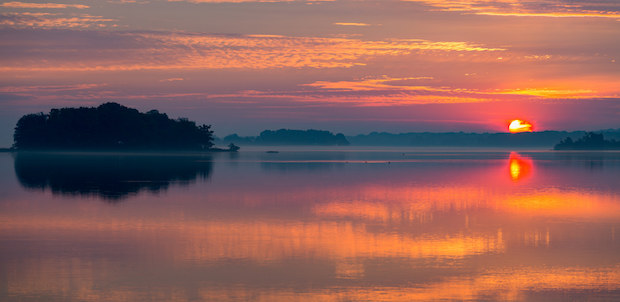
Raw is not magic, though. If every color channel in an area was clipped at the moment of exposure, that detail was never recorded, and no software can bring it back. Exposing carefully still matters.
White balance is just a setting
With a JPEG, the camera’s white balance is baked in. Correcting a strong orange or blue cast afterward costs quality. In a raw file, white balance is only a label the software reads, so you can set any color temperature you want after the fact with no loss at all. This alone makes raw worth it under mixed or artificial light.
Edits that never damage the original
Raw editors never change the raw file. They save your adjustments as a list of instructions, either in a catalog or in a small sidecar file next to the raw, and apply them each time you view or export the picture. You can undo anything, try several versions of the same photo, or reprocess an old picture years later with better software.
What raw costs you
The costs are the other side of the same coin: raw files are several times the size of JPEGs, they fill the camera’s buffer sooner in a burst, every picture has to be processed before you can share it, and an unedited raw file looks flatter than the camera’s JPEG because none of the camera’s contrast, color or sharpening has been applied yet.
Trying to decide which format to use? Raw vs JPEG compares the two side by side, including file size, raw plus JPEG mode and when JPEG is the better choice.
Does your raw file change its look a second after you import it? Why raw photos look different from the camera preview explains the embedded JPEG and how to get a matching starting point.
How to start shooting raw
- Find the image quality or file format setting in your camera’s menu and choose RAW (or RAW + JPEG). On a phone, look for a raw or DNG option in the camera settings or in a camera app that supports it.
- Check your memory card. Raw files fill cards faster, so a fast card with plenty of room helps.
- Expose for the highlights. Use the histogram and highlight warning, and avoid clipping anything important. Remember that the camera’s histogram is built from the preview JPEG, so it is a slightly cautious guide to what the raw file holds.
- Import the files into a raw editor and start with the basics: white balance, exposure, highlights and shadows, then contrast.
- Export a JPEG for sharing, and keep the raw files as your originals.
Want to shoot raw on your phone? The mobile raw workflow covers how phone raw differs from camera raw and how to edit it on the phone itself.
Common mistakes with raw files
- Judging the file before editing it. A flat raw file is not a worse photo. Give it a basic edit before you decide.
- Getting careless with exposure. Raw gives you latitude, not a free pass. Clipped highlights are gone for good, and underexposed shadows still get noisy when lifted.
- Deleting the raw files after export. The JPEG is a copy with most of the data discarded. Keep the raw file if you might ever want to edit the picture again.
- Running out of space on a shoot. Work out how many raw files fit on your card before you leave, and carry a spare.
Try this
Set your camera to raw plus JPEG and photograph a scene with a bright sky and a shaded foreground. Open both files in your editor. Pull the highlights down and the shadows up by the same amount on each, and change the white balance by a large step. Compare the sky, the shadow noise and the color. Ten minutes of this shows you exactly what raw gives you on your own camera.
Frequently asked questions
What is raw in photography?
Raw is a file setting that saves the unprocessed data from the camera’s sensor instead of a finished JPEG. You then process the file yourself in editing software, which gives you much more control over exposure, color and detail.
Is a raw photo better quality than a JPEG?
Straight out of the camera, a raw file often looks worse, because nothing has been applied to it yet. Its advantage is what you can do with it: it holds far more tonal and color information, so a well edited raw file can look better than any JPEG, especially in difficult light.
Can you open raw files without special software?
Most computers and phones can show a preview of common raw formats, but to edit one properly you need a raw converter. Many cameras also include free raw software, and there are free open source raw editors.
Can a JPEG be converted to raw?
No. A JPEG has already had most of the sensor data thrown away, and converting it to a raw or DNG container does not bring that data back. The only way to get a raw file is to shoot one.
Do professional photographers shoot raw?
Most do for anything they will edit, because raw protects them against exposure and white balance mistakes. Some who need to deliver pictures within minutes, such as news and sports photographers on deadline, shoot JPEG or raw plus JPEG. Raw vs JPEG sets out how to choose for your own work.
Test Your Knowledge
Ready to test what you’ve learned? Try these related quizzes: