Exposure compensation is the control marked +/- that tells the camera to make its automatic exposure brighter or darker than the meter suggests. It is measured in stops, usually in one-third steps across a range of three to five stops either way. Dial toward plus for scenes that are mostly bright, such as snow, sand or a backlit subject (+1 to +2), and toward minus for scenes that should stay dark, such as night streets and spotlit stages (-1 to -2).
This guide explains what the control physically changes in each shooting mode, why meters make predictable mistakes, and which values to start from for common scenes. It also covers how to confirm the result on the histogram, how the control differs from flash exposure compensation, and how it works with bracketing. For how the meter arrives at its reading in the first place, see camera metering modes; for freezing a single reading instead of shifting all of them, see AE lock.
What the +/- control does
In any automatic exposure mode, the camera meters the scene and picks settings to hit a target brightness. Exposure compensation moves that target. At +1 the camera aims one stop brighter than its own reading, which means twice as much exposure. At -1 it aims one stop darker, or half as much. The meter keeps working and keeps following the light; every reading is simply shifted by the amount you set.
The control takes one of three forms:
- A dedicated dial on the top plate, marked from -3 to +3. You can see the setting at a glance, even with the camera off.
- A +/- button that you hold while turning a command dial. The value shows on a scale in the viewfinder and on the screen.
- A command dial that acts directly in the automatic modes, with no button needed. This is fast, and easy to knock by accident.
The scale in the viewfinder reads like a ruler with zero in the middle. Each large mark is one stop and the small marks between are thirds. A pointer at the second small mark to the right of zero means +2/3. On phones, the equivalent is the brightness slider that appears when you tap the screen, usually shown as a small sun.
With an electronic viewfinder or the rear screen, the preview brightens and darkens as you turn the dial. Through an optical viewfinder nothing visibly changes, and you judge the result by reviewing the picture.
What it changes in each shooting mode
A picture can only get brighter if the shutter stays open longer, the aperture opens wider or the ISO rises. Exposure compensation uses whichever of those the camera is controlling in the current mode. Knowing which one moves tells you what the adjustment will cost.
| Mode | What compensation changes | What to watch |
|---|---|---|
| Aperture priority, fixed ISO | Shutter speed | +2 turns 1/60 into 1/15, slow enough to blur a handheld shot |
| Aperture priority, Auto ISO | Shutter speed until it reaches the minimum you allowed, then ISO | Plus compensation in dim light raises noise |
| Shutter priority, fixed ISO | Aperture | No effect once the lens is already at its widest or smallest aperture |
| Shutter priority, Auto ISO | Aperture, ISO or both | Depth of field may change with each adjustment |
| Program | Shutter speed, aperture or both | Check both numbers after adjusting |
| Manual with Auto ISO | ISO | Minus compensation cannot go below base ISO; plus stops at your ISO ceiling |
| Manual, fixed ISO | Nothing in the picture | You have set all three values, so there is nothing left for the camera to move. On some cameras the dial only shifts where the meter scale shows zero. |
| Full auto and scene modes | Often unavailable | Switch to program mode to get the control back |
Two consequences follow. First, compensation has limits. If aperture priority is already at the longest shutter time the camera allows, or Auto ISO is already at its ceiling, more plus compensation does nothing. Second, manual mode with Auto ISO is still an automatic exposure mode, and exposure compensation is the only way to make its pictures brighter or darker without giving up the shutter speed or aperture you chose.
Why the meter gets fooled
The camera measures light reflected from the scene. It cannot know whether it is looking at a white wall in dim light or a gray wall in bright light, because both send the same amount of light to the sensor. So it makes an assumption: that the scene, averaged out, should be recorded as a medium tone, known as middle gray. For a typical view with some sky, some shadow and a mix of colors, that assumption is close enough.
It fails when the scene is not average:
- Mostly bright scenes. Snow, pale sand, fog, a white wall, a page of text. The meter reduces exposure to pull all that brightness down to a medium tone, and white turns gray. These need plus compensation.
- Mostly dark scenes. A night street, a black dog on dark ground, a performer on an unlit stage. The meter increases exposure to lift the darkness to a medium tone. Blacks turn to murky gray, lights burn out, and the shutter speed becomes needlessly long. These need minus compensation.
- A small subject against a very different background. A person in front of a bright window, or a bird against the sky. The background fills most of the frame and sets the exposure, leaving the subject too dark. A bright subject on a dark background has the opposite problem.
The correction goes the same way as the scene: bright scene, add exposure; dark scene, subtract. It feels backwards until you remember that you are undoing what the meter did.
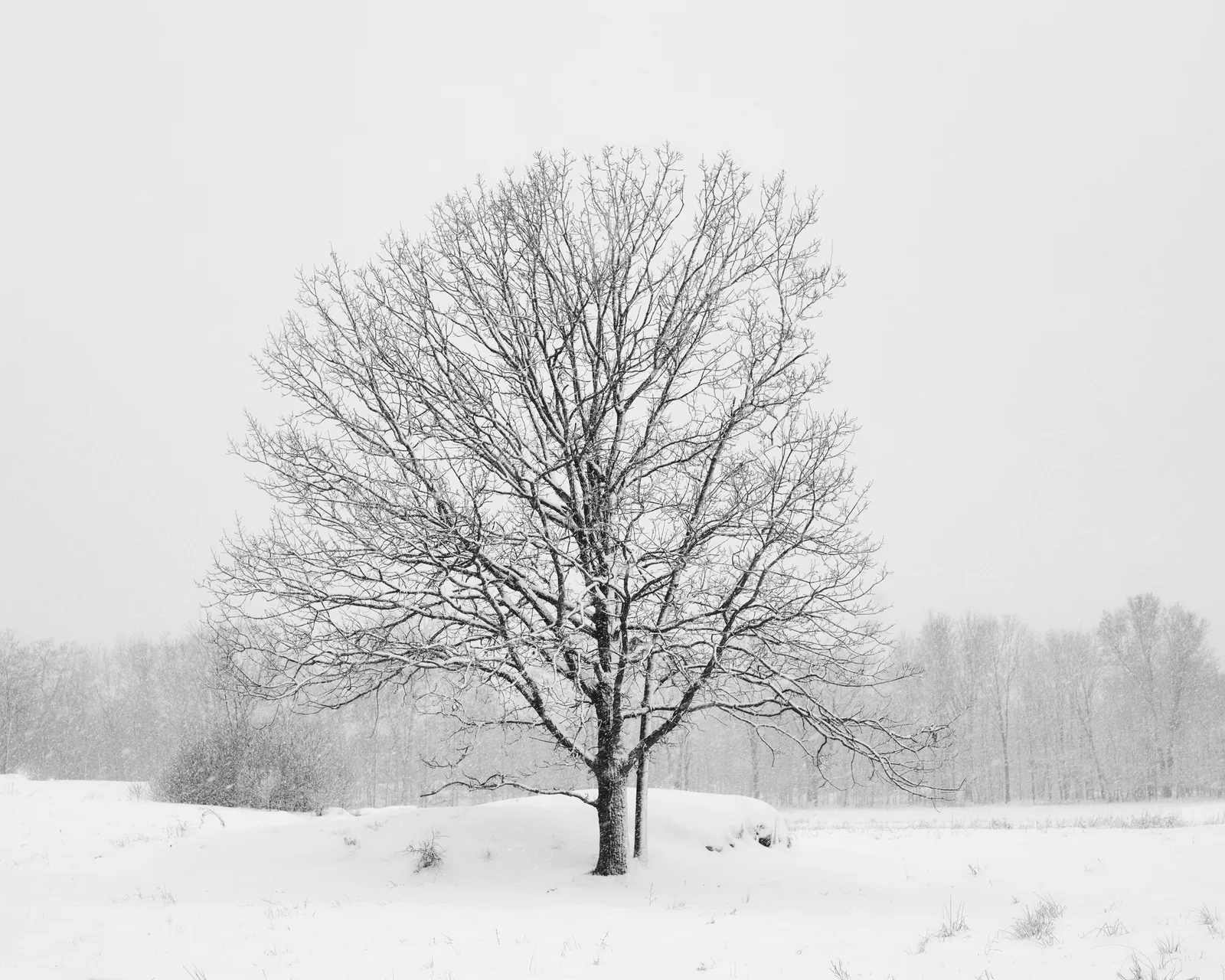
Multi-segment metering (called matrix, evaluative or multi, depending on the maker) compares the scene with patterns the maker has built in, and it already corrects some of these cases in part. It may brighten a snow scene somewhat without being asked. That is why the values in the next section are starting points: a camera using center-weighted or spot metering does no such guessing and usually needs the larger figure, while multi-segment metering often needs the smaller one.
Want to see a meter fooled, and fix it? The camera simulator has a Snow scene that comes out too dark and a Live music scene that comes out too bright until you dial in compensation.
Starting values by scene
Set the value, take one frame, check it, and adjust by a third or two thirds of a stop. After a few outings these become habits.
| Scene | Start at | Why |
|---|---|---|
| Evenly lit scene with mixed tones | 0 | The meter’s assumption holds |
| Snow filling the frame, sunny | +1 1/3 to +2 | Keeps snow white with texture |
| Pale sand, bright beach | +2/3 to +1 1/3 | Sand is lighter than a medium tone but darker than snow |
| Fog and mist | +1 to +2 | Fog should look luminous, not like dirty gray |
| Person against a window or bright sky | +1 to +2 | Exposes for the face and lets the background go bright |
| Bird or aircraft against overcast sky | +1 to +2 | A white sky is several stops brighter than the subject’s underside |
| Bird or aircraft against clear blue sky | +1/3 to +1 | Blue sky away from the sun is close to a medium tone |
| White subject on a dark background (swan on dark water, white flower in shade) | -2/3 to -1 1/3 | The dark surroundings push the meter up and the whites clip |
| Dark subject filling the frame (black dog, dark fur, dark machinery) | -2/3 to -1 | Keeps black looking black |
| Sunset or sunrise sky as the subject | -1/3 to -1 | Deepens color and protects the brightest cloud |
| Deliberate silhouette | -1 to -2 | Pushes the subject to solid black |
| City street at night | -2/3 to -1 1/3 | Night should look like night; protects lit signs and windows |
| Spotlit performer on a dark stage | -1 to -2 | The dark stage fools the meter into burning out the performer |
Topic guides give more detail on the hardest of these: winter photography for snow, backlighting for subjects with the light behind them, and silhouettes for the deliberate version of the same situation.
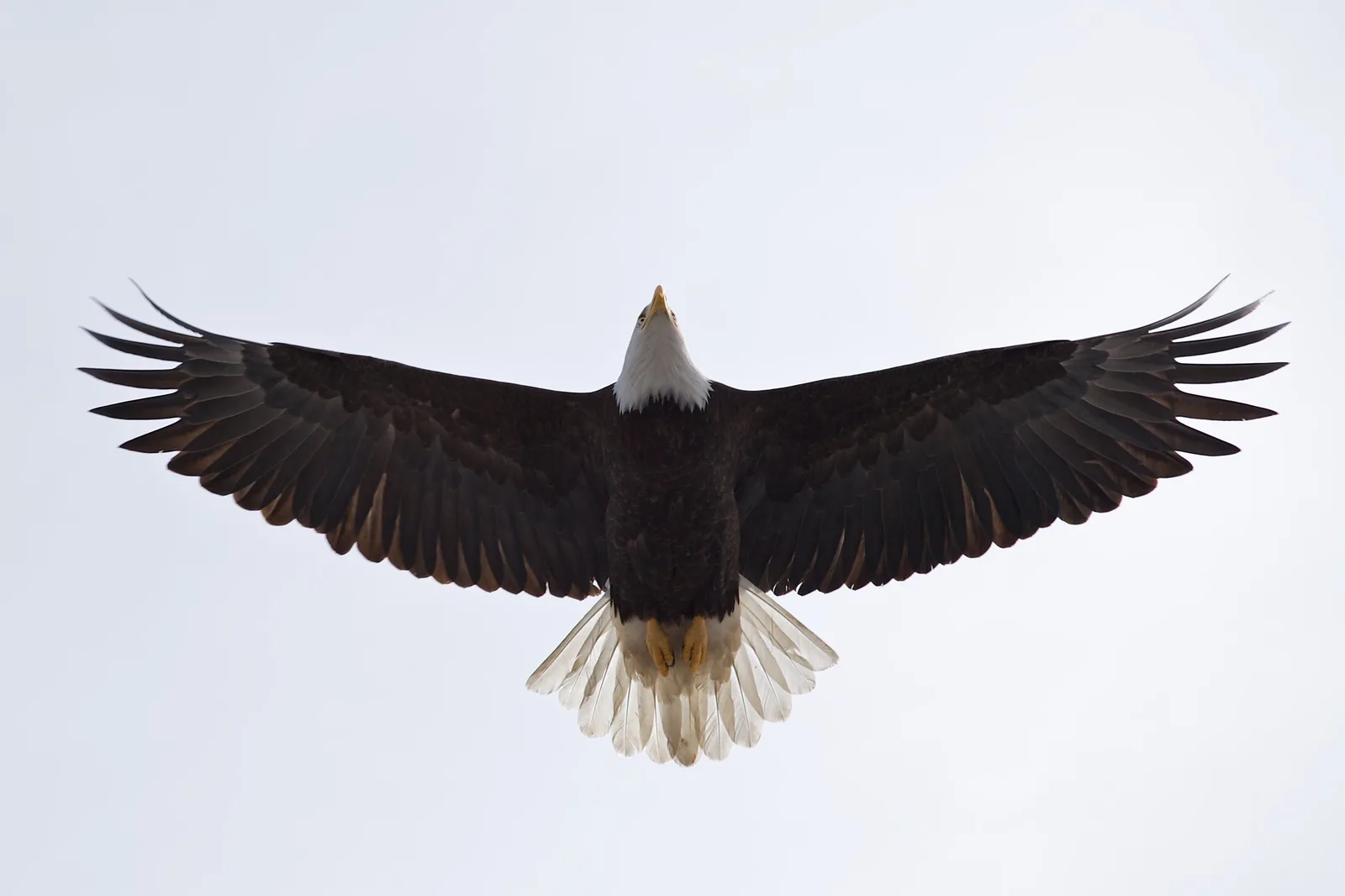
The eagle shows the trade you accept with plus compensation. The sky has gone almost to plain white, and that is the price of seeing brown feathers and the pale tail instead of a black cutout. When the background matters as much as the subject, compensation alone cannot hold both.
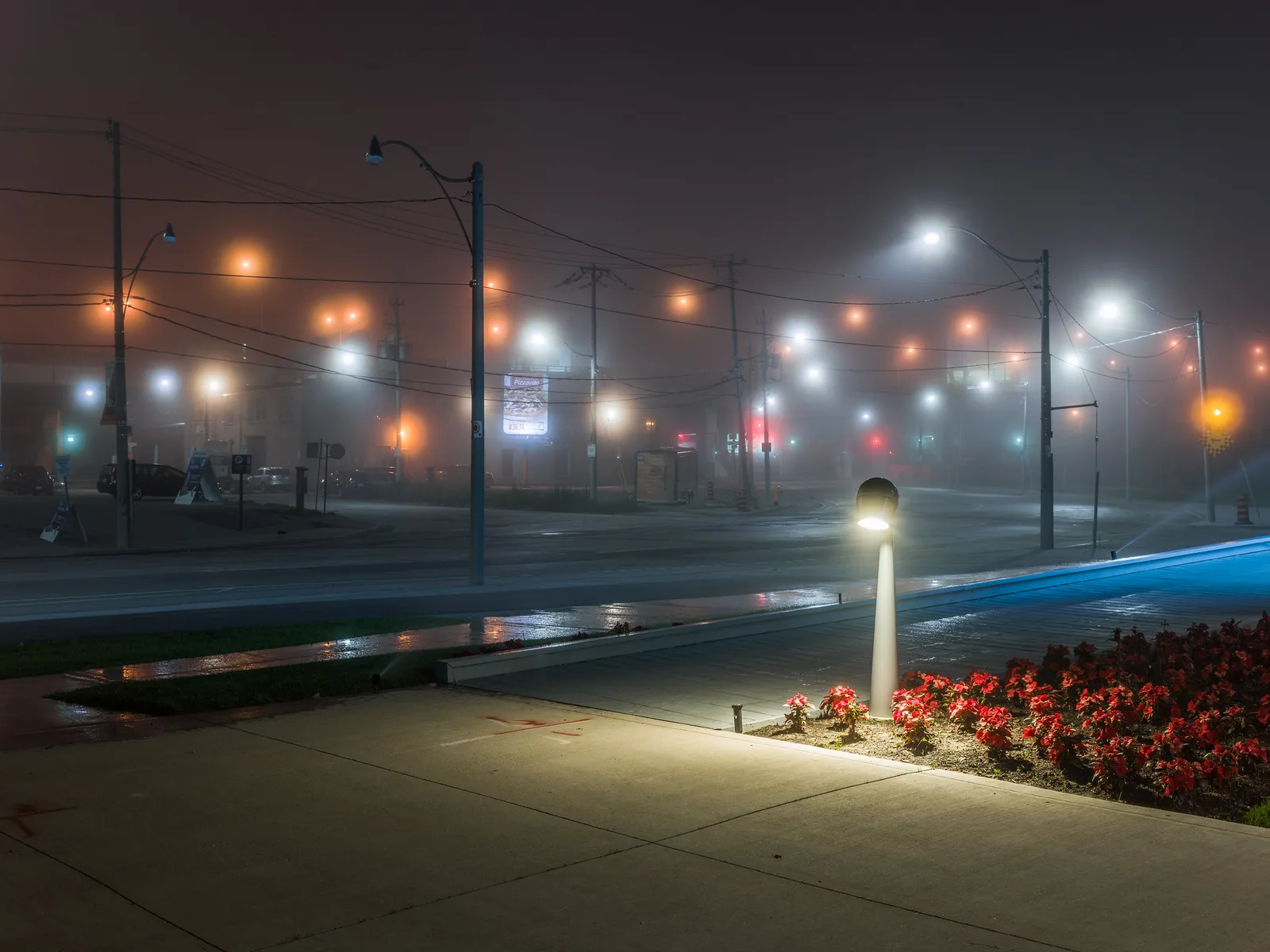
Night works the other way. Left at zero, an automatic mode would try to lift this pavement and sky toward a medium tone, which stretches the exposure, turns each lamp into a larger burned-out blob and removes the feeling of darkness. Minus compensation keeps the mood and shortens the shutter time as a bonus. Night photography covers the rest of the settings.
Checking the result: histogram and highlight warnings
The picture on the rear screen is a poor guide to exposure, because screen brightness and the light you are standing in both change how it looks. Two tools are more reliable.
The histogram is a graph of the tones in the picture, from black at the left edge to white at the right. Use it to check compensation like this:
- Snow, fog, sand: the main hump should sit in the right third, close to the right edge without piling up against it. A hump in the middle means the white has come out gray: add more.
- Night and low-key scenes: the main hump belongs on the left. A hump in the middle means the scene has been lifted too far: subtract.
- A spike jammed against the right edge: highlights are clipped to pure white. Subtract until it pulls away, unless the clipped area is something that should be featureless, such as the sun or a bare lamp.
The highlight warning makes clipped areas flash in playback. It answers the question the histogram cannot: where in the picture the clipping is. A flashing sky behind a correctly exposed face may be acceptable. A flashing forehead or wedding dress is not. Mirrorless cameras can show a live histogram, and many offer zebra stripes that mark near-clipped areas before you shoot, so you can set compensation with no test frame at all.
If you shoot raw, the file usually holds a little more highlight detail than the histogram suggests, because the graph is drawn from a processed preview. Treat that as a safety margin, not as license to ignore the warning. The full method is in how to read a camera histogram, and deliberately pushing exposure to the right edge for cleaner shadows is covered under expose to the right.
Flash exposure compensation, bracketing and AE lock
Exposure compensation vs flash exposure compensation
A flash picture contains two exposures at once: the ambient light already in the scene and the burst from the flash. They have separate controls.
- Exposure compensation adjusts the ambient part: how bright the room, sky or background is.
- Flash exposure compensation, marked with a lightning bolt beside the +/- symbol, adjusts only the power of an automatic (TTL) flash: how bright the flash-lit subject is.
For outdoor fill flash, a typical combination is exposure compensation at 0 or -1/3 to keep the sky, and flash compensation at -1 to -1 2/3 so the flash lifts shadows without looking like flash. One caution: on some cameras the main compensation dial changes ambient and flash together by default, and a menu option restricts it to ambient only. Check which yours does by shooting a flash frame at +1 and seeing whether the subject, the background or both get brighter. Balancing flash and ambient light explains the two-exposure idea in depth.
Bracketing builds on your compensation value
Auto exposure bracketing takes a set of frames at different exposures, for example at -1, 0 and +1. On most cameras the set is centered on the current compensation value, not on zero. With +1 dialed in for a snow scene, a one-stop bracket of three frames gives 0, +1 and +2. Compensation puts the middle frame where you think the right exposure is, and the bracket covers you either side.
When AE lock or manual is the better tool
Compensation is ideal when the meter is wrong in the same direction for many frames in a row, such as a morning on a snowfield. When only one composition is the problem, locking a reading from a medium tone is quicker. When the light is steady and the subject keeps moving between light and dark backgrounds, such as a bird crossing from sky to trees, no single compensation value is right for both, and manual exposure set for the subject is the stable choice.
Common mistakes
Forgetting to set it back to zero. The value stays put between shots and, on most cameras, after the power is switched off. The +1 2/3 you set for snow will overexpose everything you shoot indoors that evening. Fix: make zeroing the dial part of putting the camera away, and glance at the scale whenever you pick it up. Some cameras offer a menu option that resets the value at power-off.
Turning the wrong way. Darkening a snow scene because it “looks bright” gives gray snow. Fix: remember that you are correcting the meter. Bright scene, plus. Dark scene, minus.
Ignoring what the adjustment did to the shutter speed. In aperture priority, +2 in dim light can quadruple the exposure time and blur the picture. Fix: read the shutter speed after adjusting, and raise the ISO or use Auto ISO with a minimum speed.
Expecting it to work in full manual. With shutter speed, aperture and ISO all fixed, the dial changes nothing in the picture. Fix: change one of the three settings yourself, or turn on Auto ISO.
Trying to rescue a subject by clipping everything else. Plus three on a backlit face in front of a sunlit street gives a pale face in a white void. Fix: move the subject, turn them toward the light, or add fill flash.
Relying on raw to fix it later. Clipped highlights contain no detail to recover, and lifting a badly underexposed file brings up noise. Fix: get within about a stop in camera, erring toward protecting highlights.
Try this
This takes about fifteen minutes and needs a sheet of white paper, something black (a jacket or a camera bag) and even light, such as open shade or a room lit by a window. Set aperture priority and a fixed ISO.
- Fill the frame with the white paper and shoot at 0, +1 and +2. Note the shutter speed for each.
- Fill the frame with the black object and shoot at 0, -1 and -2.
- Compare the two frames shot at 0. They will look surprisingly similar: both a medium gray.
- Look at the histogram for each frame and watch the hump move one stop at a time.
- Pick the frame where the paper looks white with visible texture, and the frame where the black looks black with visible detail. Those values are your camera’s corrections for a white-filled and a black-filled frame with this metering pattern.
- Set the dial back to zero.
Frequently asked questions
Does exposure compensation work in manual mode?
Only if Auto ISO is on, in which case it changes the ISO the camera chooses. With a fixed ISO in manual mode, you control every setting, so the dial has no effect on the picture. On some cameras it shifts the zero point of the meter scale instead.
Is exposure compensation the same as changing ISO?
No. Exposure compensation tells the camera how bright the result should be, and the camera then changes whichever setting it is controlling. Changing ISO yourself in aperture priority does not make the picture brighter: the camera simply picks a faster shutter speed to arrive at the same brightness.
Why are my snow photos gray?
The meter assumes the scene should average out to a medium tone, so it darkens a frame full of white. Add +1 to +2 stops of exposure compensation and check that the histogram sits near the right edge without touching it.
What does +1 EV mean?
EV stands for exposure value, and one EV is one stop. Plus one EV means twice the exposure the meter suggested; minus one EV means half. Most cameras move in steps of one third of an EV.
Why did my exposure compensation stop having any effect?
The camera has run out of adjustment. In shutter priority the lens may already be wide open, in aperture priority the shutter may be at its longest time, or Auto ISO may be at its ceiling. Change the setting you control, or raise the limit.
Related guides
- Camera metering modes: what each pattern measures, which decides how much correction you need.
- AE lock: holding one reading while you recompose, for one-off problem frames.
- Auto ISO: how compensation behaves when the camera is choosing the ISO.
- Shutter priority mode: where compensation moves the aperture and can run out of range.
- How to read a camera histogram: the graph that confirms whether your correction worked.
- Dynamic range explained: why some scenes cannot be held at any single exposure.
- Blown highlights: what clipping is and how to avoid it.