Long exposure photography transforms ordinary scenes into something otherworldly. Silky waterfalls, streaking car lights, ghostly clouds, and mirror-smooth ocean surfaces all rely on extended shutter speeds that stretch well beyond what a camera can achieve on its own in daylight. Neutral density (ND) filters make this possible by reducing the light entering your lens, allowing you to use shutter speeds of seconds, minutes, or even longer.
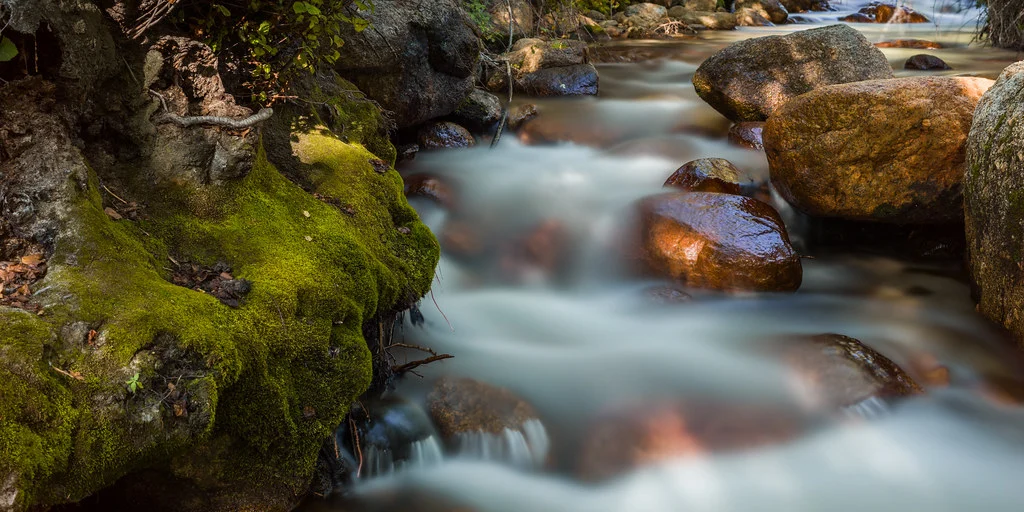
The challenge is calculating exactly how long your new shutter speed needs to be after adding an ND filter. If your correct exposure without a filter is 1/125 second and you add a 10-stop ND filter, the new shutter speed becomes approximately 8 seconds. That math is not intuitive, especially in the field when you are working quickly to catch the light.
This exposure calculator handles the conversion instantly. Select your base shutter speed (the correct exposure without the filter), choose the strength of your ND filter, and the calculator shows your new shutter speed in a readable format. No more fumbling with stop calculations while the golden hour slips away.
Below the calculator, you will also find a reference table showing the relationship between ND filter stop values, ND numbers (like ND8, ND64, ND1000), and optical density ratings. These different naming systems can be confusing, and having a quick reference eliminates any guesswork about which filter does what.
ND Filter Exposure Calculator
New Shutter Speed
ND Filter Reference Table
| Stops | ND Number | Optical Density | Light Transmitted |
|---|---|---|---|
| 1 | ND2 | 0.3 | 50% |
| 2 | ND4 | 0.6 | 25% |
| 3 | ND8 | 0.9 | 12.5% |
| 4 | ND16 | 1.2 | 6.25% |
| 5 | ND32 | 1.5 | 3.13% |
| 6 | ND64 | 1.8 | 1.56% |
| 7 | ND128 | 2.1 | 0.78% |
| 8 | ND256 | 2.4 | 0.39% |
| 9 | ND512 | 2.7 | 0.20% |
| 10 | ND1024 | 3.0 | 0.10% |
| 12 | ND4096 | 3.6 | 0.024% |
| 15 | ND32768 | 4.5 | 0.003% |
Not sure which strength of filter to carry? The ND filter guide converts stops, ND numbers and exposure times, and compares fixed with variable filters.
Got the exposure time and wondering how to shoot it? How to shoot long exposure photos covers the settings, the gear that matters and keeping the camera still.
Planning this for moving water? How to photograph waterfalls covers which shutter speeds give which look.
Understanding ND Filters and Long Exposure Photography
A neutral density filter is essentially sunglasses for your lens. It reduces the amount of light entering the camera without changing the color or character of the light. This lets you use slower shutter speeds than would otherwise be possible, opening up a world of creative possibilities that are simply not achievable without them.
How ND Filters Work
ND filters are rated by the number of stops of light they block. Each stop represents a halving of light. A 1-stop ND filter cuts light in half, requiring you to double your shutter speed to maintain the same exposure. A 10-stop ND filter reduces light by a factor of 1,024, which means a base exposure of 1/125 second becomes roughly 8 seconds.
The naming conventions for ND filters can be confusing because manufacturers use three different systems. The “stops” system is the most intuitive. The “ND number” system uses powers of 2 (ND2 = 1 stop, ND4 = 2 stops, ND8 = 3 stops). The “optical density” system uses increments of 0.3 (0.3 = 1 stop, 0.6 = 2 stops, 0.9 = 3 stops). The reference table above shows all three systems side by side.
Choosing the Right ND Filter
The strength of ND filter you need depends on the lighting conditions and the shutter speed you want to achieve. Here are some common use cases.
- 3-stop (ND8): Useful for shooting wide open in bright conditions, such as using f/1.4 for portraits in sunlight. Also smooths water slightly at slower speeds.
- 6-stop (ND64): A versatile middle ground. Turns a 1/125s exposure into roughly half a second. Good for blurring waterfalls and streams in daylight.
- 10-stop (ND1024): The classic long exposure filter. Transforms a 1/125s exposure into 8 seconds. Smooths ocean water to glass, streaks clouds across the sky, and erases moving people from busy scenes.
- 15-stop (ND32768): Extreme long exposure. A 1/125s exposure becomes over 4 minutes. Creates ethereal, dreamlike images with very long exposures even in bright midday sun.
Many photographers carry a 6-stop and a 10-stop filter, which can be stacked for 16 stops total when needed. Some opt for variable ND filters that can be adjusted across a range, though these can introduce color shifts and cross-pattern artifacts at their strongest settings.
Long Exposure Workflow
Getting a successful long exposure requires a methodical approach. Here is a step-by-step workflow that experienced photographers follow.
- Compose and focus first. Set up your tripod, frame your shot, and focus with autofocus before attaching the ND filter. Strong ND filters (6+ stops) block so much light that your camera’s autofocus system will not be able to lock on.
- Switch to manual focus. Once focus is locked, switch your lens to manual focus so it does not hunt when you press the shutter.
- Meter without the filter. Take a test shot or note your camera’s metered exposure without the filter. This is your base exposure.
- Calculate the new shutter speed. Use this calculator to determine the new shutter speed after adding the filter.
- Attach the filter. Screw on or slide in the ND filter. Be careful not to bump the focus ring.
- Set the camera to Bulb mode. For exposures longer than 30 seconds, you will need Bulb mode and a remote shutter release or the camera’s built-in timer.
- Cover the viewfinder. On DSLR cameras, light can enter through the optical viewfinder and cause light leaks during long exposures. Cover it with the eyepiece cap or a piece of tape. Mirrorless cameras do not have this issue.
- Shoot and review. Take the exposure and check the histogram. Adjust as needed. ND filters can sometimes cause slight underexposure due to manufacturing tolerances.
Creative Applications of Long Exposure
Smooth water. This is the most popular use of ND filters. Exposures of 1 to 5 seconds turn rushing water into a silky flow while preserving the texture of rocks and surrounding landscape. Exposures of 30 seconds or more flatten ocean waves into a misty, ethereal surface.
Cloud streaks. Exposures of 2 to 5 minutes cause moving clouds to streak across the sky, creating dramatic leading lines and a sense of motion. This works best with scattered clouds rather than uniform overcast skies.
Ghost removal. In busy tourist locations, a long exposure of several minutes can effectively erase moving people from the scene, leaving only the static architecture. Any person who stands still for a significant portion of the exposure may leave a faint ghost.
Light trails. While you can capture car light trails at twilight without an ND filter, using one during the blue hour or early dusk extends your exposure time significantly, creating longer and more dramatic light streaks.
Minimalist compositions. Long exposures simplify scenes. Choppy water becomes smooth, busy skies become gradients, and chaotic movement becomes serene stillness. This lends itself to minimalist, fine-art photography styles.
ND Filter Quality Matters
Not all ND filters are created equal. Cheap filters can introduce strong color casts (usually warm or magenta), reduce sharpness, and create uneven density across the frame. Quality glass or resin filters from reputable manufacturers maintain color neutrality and optical clarity. If you are serious about long exposure work, invest in good filters. A color cast can often be corrected in post-processing, but sharpness loss cannot.
Circular screw-on filters are convenient and do not allow light leaks, but you need a different size for each lens diameter (or an adapter ring system). Square filter systems with a holder are more versatile since one filter fits multiple lenses, but they require more setup time and can allow light to creep in around the edges during very long exposures.
Stacking ND Filters
You can stack multiple ND filters to increase the total light reduction. A 6-stop and a 10-stop filter used together give you 16 stops. However, stacking introduces potential issues. Vignetting (dark corners) can occur, especially on wide-angle lenses. Each additional glass surface increases the chance of flare, ghosting, or slight softness. Use stacking as a solution when you need more stops than a single filter provides, but be aware of these tradeoffs.
Related Guides and Tools
- How to Photograph Waterfalls: Silky water effects with long exposures and ND filters
- How to Photograph Stars: Calculating star trail and Milky Way exposure times
- Light Painting Photography: Creative long-exposure techniques with handheld lights
- Depth of Field Calculator: Preview focus range for any aperture and focal length
- Hyperfocal Distance Calculator: Maximize sharpness for landscape long exposures