A phone long exposure blurs anything that moves, like water, clouds, traffic lights or crowds, while still parts stay sharp. Phones do this in three main ways: a built-in long exposure or motion effect that blends a short clip into one photo, a night mode that gathers light over several seconds, or a manual or pro mode where you choose a slow shutter speed. Keep the phone completely still with a small tripod or a steady surface, use the self-timer, tap to set focus and brightness, and shoot moving subjects against still backgrounds.
Long exposure photos have a dreamy, magical look: waterfalls turn silky, seas become misty, car lights stretch into glowing lines, and busy streets empty as walking people blur away. Not long ago, this needed a camera, a tripod and special filters. Now most phones can create long exposure effects with a few taps.
This guide explains what a long exposure is, how phones create the effect, the different methods, how to keep things sharp, the best subjects, and the common mistakes beginners make. There is a 10-minute exercise and an FAQ at the end. If you want to understand the idea with any camera, the full guide to long exposure photography covers it in depth.
What a long exposure is
Every photo is made by letting light reach the sensor for a period of time. That time is called the shutter speed. The guide to shutter speed explains it fully. Most everyday photos use very short times, a tiny fraction of a second, which freezes movement.
A long exposure uses a longer time, from about half a second to many seconds. During that time, anything moving is recorded across many positions, so it turns into a blur or a streak. Anything still stays sharp. That combination, still parts sharp and moving parts blurred, is what makes long exposures so striking. The guide to motion blur explores how blur shows movement in other kinds of photos too.
How phones create long exposures
Phones have tiny sensors and usually no adjustable aperture, so they cannot always take a true single long exposure in bright light without the photo turning white. Instead, they often use clever processing. There are three main approaches.
1. Motion or long exposure effect
Many phones can record a short moving clip, a second or two, along with each photo. Afterwards, you can choose an effect that blends all the frames of that clip into one image. Moving water blurs, while still rocks stay sharp because the phone lines the frames up.
This is the easiest method and works well in daylight. Look in your gallery for an option such as “long exposure” or “motion” on a photo taken with the moving-photo feature switched on. The exact names differ between phones, so check your phone’s camera settings or help pages.
2. Night mode
Night mode takes many frames over several seconds and blends them to brighten dark scenes and reduce noise. On a tripod, some phones extend this time to many seconds, which can create light trails and smooth water at night. The guide to night photography with a smartphone covers night mode in detail.
3. Manual or pro mode
Some phones have a pro or manual mode that lets you choose the shutter speed directly. Setting it to one second or longer gives a true long exposure. In bright light, the photo may turn too bright, so this method works best at dusk, at night, or in shade. The guide to phone camera settings explains pro mode controls. Some separate camera apps also offer long exposure modes that blend frames, similar to method 1.
Keeping things sharp
The secret of a good long exposure is that the still parts are perfectly sharp. That means the phone must not move at all during the exposure.
- Use a tripod. A small phone tripod or clamp is the most reliable option. The guide on how to use a tripod explains setup.
- Use a steady surface. No tripod? Rest the phone on a wall, a rock, a bench or a bag. Prop it with a coin or folded paper to adjust the angle.
- Use the self-timer. Pressing the screen shakes the phone. A two or three second self-timer lets the shake settle before the photo starts.
- Use a remote or headphone button. Many phones can take a photo from a volume button on wired headphones or a small wireless remote.
- Hold very still if handheld. The motion effect in method 1 can work handheld because the phone aligns frames, but the steadier you are, the better. Tuck your elbows in and breathe out slowly. See how to hold your camera.
Focus and brightness
- Tap to focus on something still, like a rock beside a waterfall or a building beside a road. Many phones let you press and hold to lock focus and exposure.
- Adjust brightness with the slider that appears after tapping. Long exposures of bright water can easily turn too white, so lower brightness slightly if the moving areas lose detail.
- Turn off flash. Flash freezes motion and spoils the effect.
Best subjects for phone long exposure
Waterfalls and streams
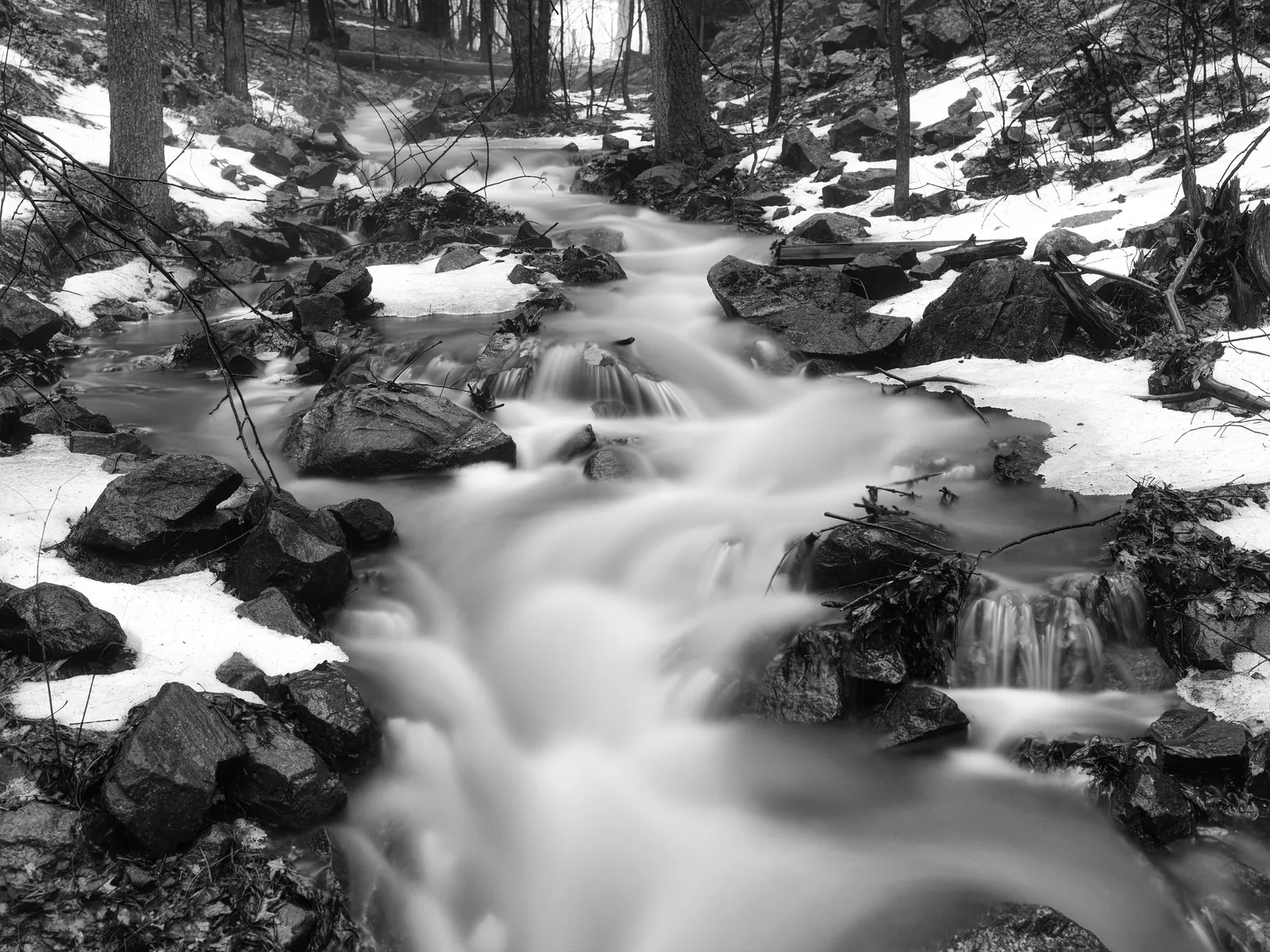
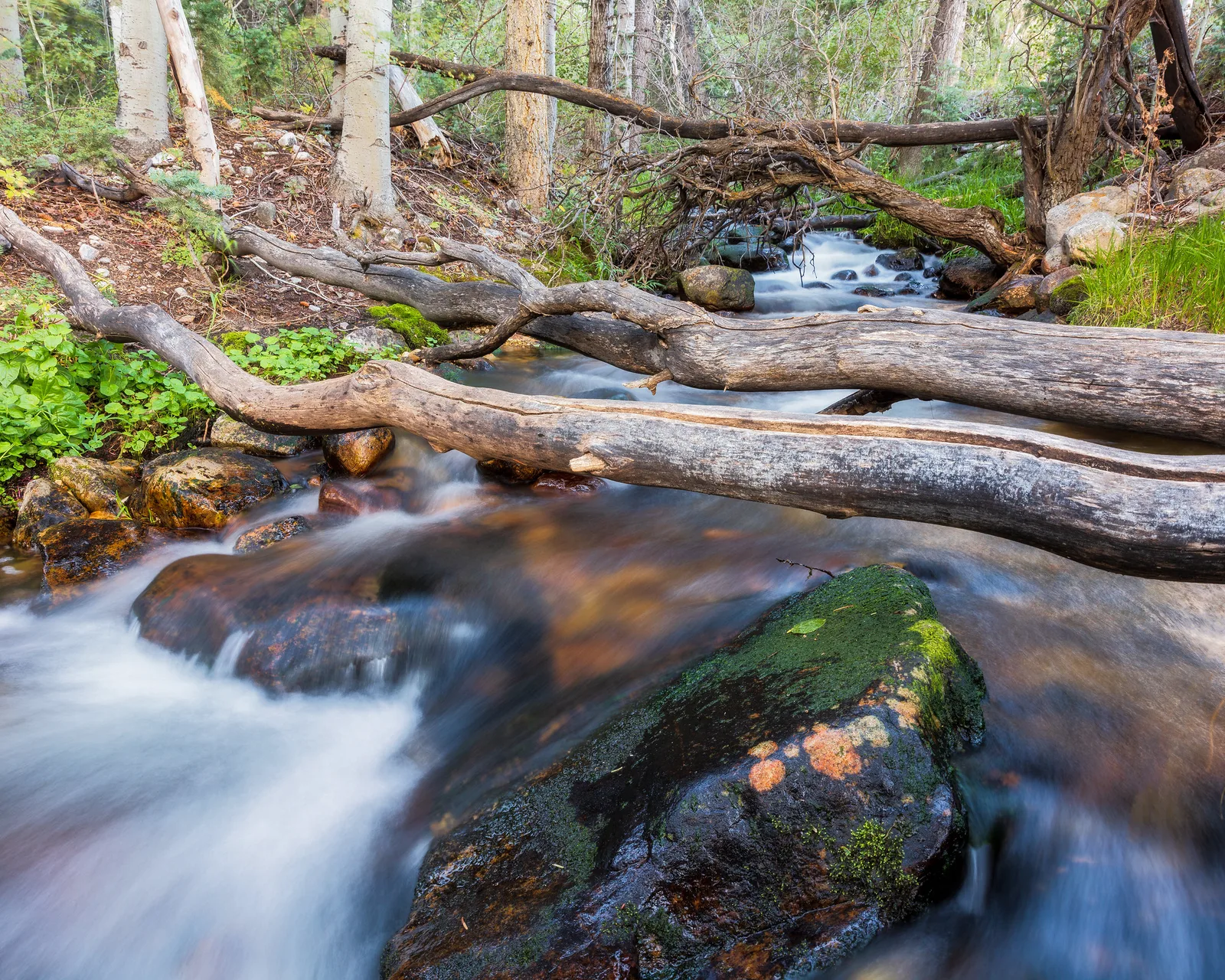
Flowing water is the classic subject. Even a small stream turns soft and silky, like the photos on this page. Frame still rocks, logs or plants beside the water so the contrast between sharp and soft is clear.
The sea and lakes
Waves blur into mist, and choppy water becomes smooth. Longer exposures smooth water more. Look for a rock, pier or post to give the photo a sharp subject.
Traffic light trails
At dusk or night, car headlights and tail lights become streaks of white and red. Find a safe spot above or beside a road, such as a bridge or pavement, and use night mode or pro mode on a tripod.
Crowds
In a busy square or station, moving people blur into ghostly shapes while buildings stay sharp. With long enough exposures, walking people may almost disappear.
Clouds
On windy days, clouds streak across the sky in longer exposures. This needs several seconds or more, so it works best at dusk or with blended methods.
Fairground rides and fountains
Spinning rides at night create circles and swirls of light. Fountains turn into soft clouds of water.
Choosing the length of the exposure
The longer the exposure, the stronger the blur. A rough guide for beginners:
- About 1/4 to 1 second: gentle movement in water, with some texture left. Good for waterfalls where you want some shape.
- About 1 to 5 seconds: silky water, short light trails, blurry walking people.
- About 5 to 30 seconds: very smooth water, long light trails, streaky clouds, crowds that nearly vanish.
With blended effects, you do not choose the time directly; it depends on the clip length. Try several and keep the one you like.
There is no single correct length. Some people love completely smooth, glassy water, while others prefer a little texture so the water still looks like it is moving. Try a short and a long version of the same scene and decide which mood you prefer. Over time you will develop a feel for how long each kind of subject needs.
Shooting in daylight
Bright light is the biggest challenge for phone long exposures, because a long exposure lets in a lot of light. Options include:
- Use the blended motion effect. It works in daylight because each frame is short.
- Shoot in shade. Forests, gorges and cloudy days have less light, which helps with pro mode.
- Shoot at dusk or dawn. Lower light allows longer shutter speeds. The blue hour is a great time for long exposures.
- Use a clip-on ND filter. An ND filter, short for neutral density, is darkened glass that reduces light without changing colour. Small clip-on versions fit over phone lenses.
Editing phone long exposures
Long exposures often need only small edits. The guide to mobile photo editing apps covers useful tools.
- Straighten the horizon or the edges of buildings.
- Lower highlights slightly if water or lights are too bright.
- Add a little contrast to make sharp rocks and buildings stand out against soft water or sky.
- Crop away any blurry edges caused by frame alignment in blended effects.
- Reduce noise carefully in night shots, without smoothing away detail.
Looking closely at the photos on this page
Both photos on this page were made with a camera on a tripod, but they show exactly the effect a phone long exposure aims for. In the snowy stream at the top, the water has turned into soft white ribbons, while the snow-covered rocks and dark branches stay crisp. Your eye reads the still parts as solid and the blurred parts as moving, so the photo feels calm even though the water was rushing.
In the forest stream, the fallen log and mossy rocks give the photo a strong, sharp subject. The water flowing underneath has been smoothed into a gentle glow. Without the log and rocks, the blur would have nothing to contrast with, and the photo would feel vague. That is the key lesson: a long exposure needs something still to make the movement meaningful.
Safety and courtesy
Long exposures often mean standing still near water, roads or crowds for a while. Stay well back from slippery rocks and edges, never stand in the road for light trails, and keep tripods out of walkways so people do not trip. Near waterfalls, spray can wet the lens, so wipe it with a soft cloth between shots. At night, let someone know where you are going if you will be somewhere quiet.
Planning a long exposure outing
A little planning makes long exposure practice much more rewarding. Start by choosing a place with reliable movement. A local stream, a fountain in a park, a busy crossing or a beach with steady waves are all good choices. Visit at a time with softer light, such as early morning, late afternoon, dusk or a cloudy day, because bright midday sun makes long exposures harder on a phone.
Before you go, check that your phone has plenty of battery and storage, because long exposure modes and night mode can use more of both. Pack a small tripod or clamp if you have one, a soft cloth for the lens, and a warm layer if you will be out after sunset. Once you arrive, take a few minutes to walk around and look for a strong still subject next to the movement before you set up.
Try to take several versions of each scene. Change your position, your height and the length of the exposure. Long exposures are hard to predict, so shooting a handful of variations gives you a much better chance of one great photo.
Small accessories that help
You do not need extra gear to start, but a few small, inexpensive items make phone long exposures easier.
- A mini tripod or flexible tripod that can stand on a table or wrap around a railing.
- A phone clamp that holds the phone securely on any standard tripod.
- A wireless remote so you can take photos without touching the phone.
- A clip-on ND filter for daylight long exposures in pro mode.
- A lens cloth to keep the lens clean, especially near water.
Start with what you have. Many beautiful phone long exposures have been made with the phone resting on a wall and the self-timer set. Add accessories only when you find yourself wanting more control.
Why phone long exposures are great practice
Phone long exposures are one of the best ways for beginners to understand shutter speed. Because the effect is so visible, you see right away how time changes a photo. A fraction of a second freezes a splash. A second makes it soft. Several seconds turn it into mist. Once you have seen this with your own eyes, the idea of shutter speed stops being abstract, and it becomes much easier to use with any camera.
Common mistakes
- Everything is blurry. The phone moved. Use a tripod or steady surface and the self-timer.
- Nothing is moving. A long exposure of a still scene just looks like a normal photo. Choose subjects with movement.
- The photo is too bright. In daylight, use the blended effect, shade, dusk or an ND filter, and lower the brightness slider.
- No sharp subject. A photo of only blurred water feels empty. Include rocks, logs, piers or buildings.
- Focusing on the moving part. Tap to focus on something still.
- Using flash. It freezes motion. Turn it off.
- Dirty lens. Smudges create haze around lights. Wipe the lens first.
Try this: a 10-minute phone long exposure
- Minute 1 to 2: Find something that moves: a tap running, a fountain, a stream, traffic, or people walking.
- Minute 3: Set your phone on a tripod or steady surface, and frame something still next to the movement.
- Minute 4: Turn on the moving-photo feature or night mode, set the self-timer, and turn off flash.
- Minute 5 to 6: Tap to focus on the still part and take several photos.
- Minute 7 to 8: In the gallery, apply the long exposure or motion effect, or review the night mode shots.
- Minute 9: Take a normal photo of the same scene for comparison.
- Minute 10: Compare. How does blur change the mood? Is the still part sharp?
Frequently asked questions
Can phones take long exposure photos?
Yes. Most phones can, using a motion or long exposure effect, night mode, or a manual mode with a slow shutter speed.
Do I need a tripod for phone long exposures?
For the sharpest results, yes, or a steady surface. Some blended effects work handheld because the phone aligns frames.
Why is my long exposure too bright?
Too much light. Use a blended effect, shoot in shade or at dusk, lower the brightness slider, or use an ND filter.
How do I make silky water with my phone?
Steady the phone, use the motion or long exposure effect, and frame still rocks next to the moving water.
How do I photograph light trails on a phone?
At dusk or night, put the phone on a tripod near a road, use night mode or pro mode with a slow shutter, and stay safe.
What is an ND filter?
A darkened filter that reduces light so you can use longer exposures in bright conditions.
Want to understand long exposure with any camera? Read the full guide to long exposure photography.
Curious how to get better phone photos after dark? Try night photography with a smartphone.