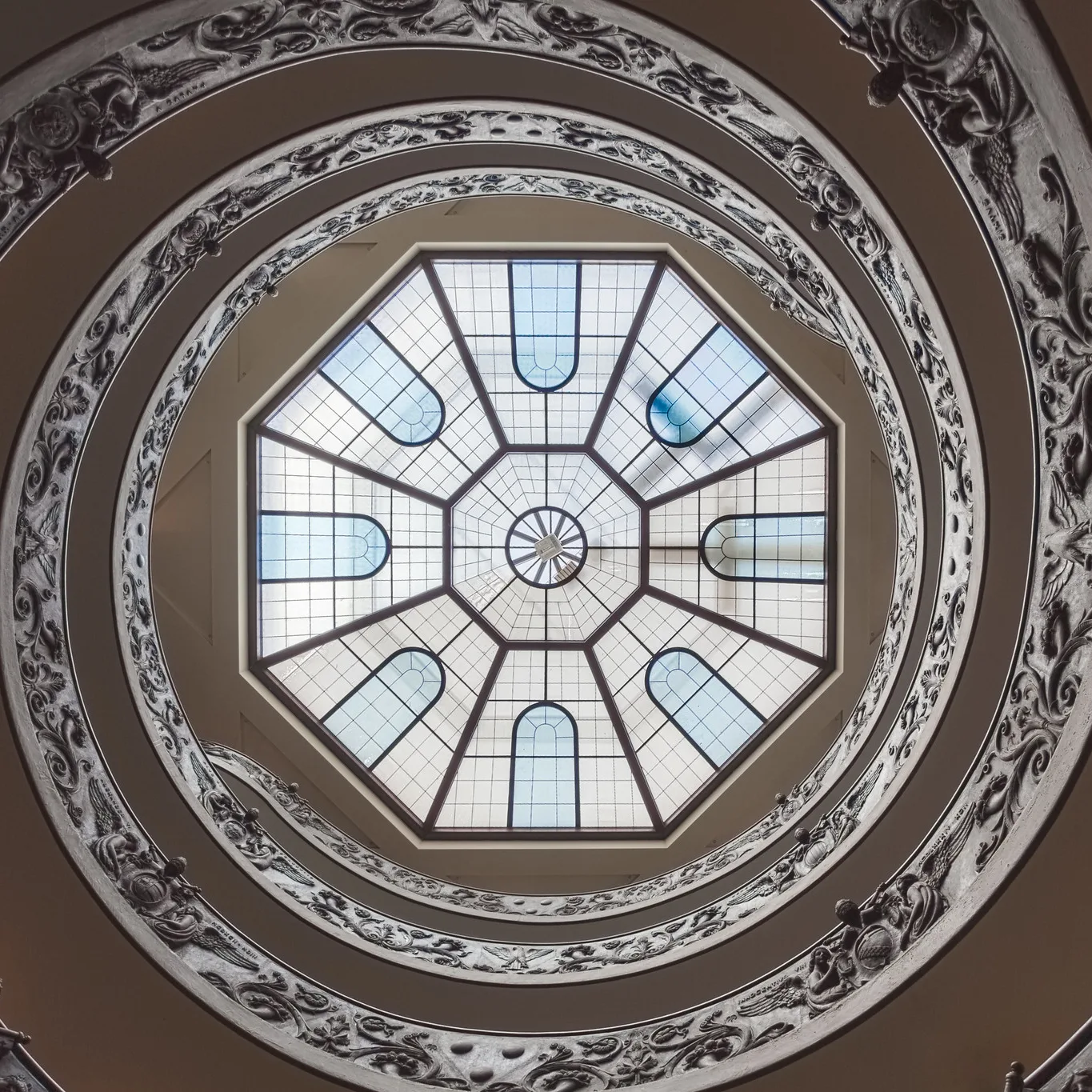
Square format means a photo with a 1:1 aspect ratio, as wide as it is tall. Squares feel calm, balanced and still, so they suit centred subjects, symmetry, circles, patterns, simple portraits and minimalist scenes. To shoot square, set your camera or phone to 1:1 so you can see the frame while composing, or crop later. Place strong subjects in the centre or use bold diagonals, keep the edges clean, and remember that a square has less room for wide scenes, so simplify.
Most cameras take rectangular photos, usually wider than they are tall. Yet some of the most memorable photos ever made are square. Square film cameras were common for decades, and square photos became a favourite again when social apps began showing images in square grids.
For beginners, the square is a brilliant teacher. It removes the choice between horizontal and vertical, and it forces you to think about balance and simplicity. Many people find that switching to square for a week improves their composition in every format.
This guide explains what square format is, how it feels different from rectangles, which subjects suit it, how to compose inside a square, how to shoot and crop square photos, and the common mistakes. There is a 10-minute exercise and an FAQ at the end.
What square format is
The shape of a photo is called its aspect ratio: its width compared with its height. A square photo is 1:1, meaning equal width and height. Common rectangular ratios include 3:2 (most cameras), 4:3 (many phones and smaller sensor cameras) and 16:9 (widescreen). The guide to aspect ratio compares them all.
Square photos have a long history. Many medium format film cameras, which use larger film than everyday 35mm cameras, produced square negatives. Instant cameras often made square or nearly square prints. Almost every camera and phone can shoot square with a simple setting. The medium format guide explains the larger formats in more detail.
How a square feels
Each frame shape has its own mood.
- Wide rectangles suggest movement and space. The eye travels side to side, which suits landscapes and panoramas.
- Tall rectangles suggest height and emphasise standing subjects, like people and buildings. See vertical vs horizontal photos.
- Squares have no dominant direction. The eye tends to circle around the frame and settle in the middle. That makes squares feel stable, calm, quiet and balanced.
That stillness is the square’s superpower and its challenge. It suits subjects that are calm, centred and simple. It can feel static if the subject needs movement.
A good way to feel the difference is to take the same scene in all three shapes. Photograph a doorway as a wide rectangle, a tall rectangle and a square. In the wide version, the walls on either side become part of the story. In the tall version, the height of the door stands out. In the square, the door itself becomes the whole photo, solid and centred. None is right or wrong. Each one tells the story a little differently, and choosing the shape is part of composing the photo.
Squares also change how people look at a set of photos. When every image is a square, nothing stands out because of its shape, so the viewer pays attention to content, light and colour instead. This is one reason many photographers enjoy square for personal projects and photo books.
Subjects that suit square
- Centred subjects. A single flower, a face, a door, a bowl of food seen from above.
- Circles and spirals. Round shapes fit a square naturally, like the spiral staircase at the top of this page.
- Symmetry. Buildings, reflections and doorways shot straight on look perfectly balanced in a square. See symmetry.
- Patterns and textures. Tiles, leaves, windows and fabrics fill a square evenly. The guide to patterns and repetition has ideas.
- Minimalist scenes. A small subject in lots of empty space, such as a lone tree in snow. See minimalist photography and negative space.
- Simple portraits. Head and shoulders portraits often fit a square comfortably.
- Flat lays and food from above. Objects arranged on a table look tidy in a square.
Subjects that are harder in square: wide landscapes with a long horizon, tall buildings shot full height, groups of people standing in a line, and action moving sideways across the frame.
Composing inside a square
The centre works
In rectangular frames, beginners are often told not to put the subject in the middle. In a square, the centre is often the strongest spot. Because there is equal space on every side, a centred subject feels deliberate, balanced and confident. Centre symmetrical subjects especially.
Thirds still help
The rule of thirds also works in square. Placing a subject on a third adds a little tension and leaves space for the eye to move. A horizon on the lower third with sky above works well. Avoid placing things just slightly off-centre, which looks like a mistake rather than a choice.
Diagonals add energy
Because a square is so stable, a strong diagonal line, from one corner toward the other, adds movement and drama. Roads, shadows, railings and arms can all form diagonals.
Simplify
A square holds less than a wide rectangle, so fewer things fit comfortably. Pick one clear subject and remove distractions. Step closer, change angle or zoom in.
Mind the edges and corners
In a square, the corners are closer to the subject, so stray objects there are very noticeable. Check all four corners before you take the photo.
Balance the weight
If your subject is off-centre, balance it with something smaller or with empty space on the other side. The guide to visual weight explains how some parts of a photo pull the eye more than others.

How to shoot square
Set the camera to 1:1
Most cameras and phones let you choose a 1:1 aspect ratio in the menu. This shows a square frame on the screen or electronic viewfinder, so you compose exactly what you get.
On many cameras, if you shoot RAW, the camera still records the full rectangle in the RAW file but shows and tags it as square. That gives you a safety net: you can go back to the full frame later if you want.
Crop later
You can also shoot normally and crop to square in editing. This is flexible, but it is harder to compose for a square you cannot see. If you plan to crop, leave a little extra room around your subject.
Use the grid
Turn on your camera or phone grid. It helps you centre subjects precisely and place them on thirds.
Lens choice
Any lens works. A normal or slightly longer lens keeps subjects simple; a wide lens can emphasise a centred subject with strong lines running toward it. Because squares hold less width, many people find they use slightly wider focal lengths than usual.
Cropping to square well
When cropping in editing:
- Lock the crop to 1:1 so you do not accidentally make it slightly off-square.
- Decide what to remove. From a horizontal photo, you lose the sides. From a vertical photo, you lose the top and bottom. Choose which edges hold the least important detail.
- Re-check the horizon and straighten it if needed.
- Do not crop too tight. Leave breathing room around the subject.
- Check resolution. Cropping throws away pixels. For large prints, start with a high-resolution file.
Square for social media and print
Square images display reliably on many social platforms and look tidy in grids. Some platforms favour slightly taller shapes, such as 4:5, which take up more screen space. The guide to social media photo sizes lists common shapes.
For prints, many frame and print sizes are not square, so check what is available before ordering. Square prints in square frames look elegant, especially in sets on a wall.
Square in different kinds of photography
Portraits
Square portraits feel intimate and direct, especially when the face is centred and the eyes are near the upper third. Leave a little space above the head; the headroom guide explains how much.
Street
Square street photos feel compact and graphic. Look for a single figure against a clean background, or a centred moment.
Landscape
Choose simple landscapes: a single tree, a mountain peak, a reflection. Place the horizon carefully, often on a third or exactly in the middle for reflections.
Architecture
Facades, doorways, windows and domes shot straight on look strong and symmetrical in square, like the parliament building above.
Still life and food
Overhead shots of food, plants and objects arranged neatly fit square perfectly.
Learning from a square week
A classic exercise for improving composition is to shoot only square for a week. It helps you:
- Stop thinking about horizontal versus vertical and focus on what matters in the frame.
- See the power of centring.
- Simplify scenes, because a square holds less.
- Notice edges and corners.
When you return to rectangles, you will probably find your compositions cleaner and more intentional.
Training your eye to see squares
Before you even lift the camera, you can practise seeing squares. Make a small square window with your fingers, or cut a square hole in a piece of card, and look through it as you walk. You will quickly notice which scenes fall naturally into a square and which ones keep wanting to spill out the sides.
Ask yourself three questions when you spot a possible square photo:
- Where is the centre? Is there something strong that could sit in the middle, or a natural point the eye settles on?
- What touches the edges? Lines that run cleanly out of the frame, or that stop well inside it, look tidy. Things that just touch the edge look awkward.
- Is there enough space? A square needs some breathing room. If the subject feels squeezed, step back or zoom out a little.
The more you look this way, the faster you will recognise good square compositions in real life.
Shooting square on a phone
Phones make square photography easy. Most phone camera apps have a 1:1 or square option in the main camera screen or settings. A few practical tips:
- Turn on the grid so you can see the centre and the thirds.
- Tap to focus on your subject, then slide the brightness control if the photo looks too dark or too bright.
- Hold the phone steady with both hands and elbows tucked in. The guide on how to hold your camera applies to phones too.
- Use the main lens when possible, as it usually gives the cleanest image quality.
- Check whether the phone keeps the full frame. Some phones save only the square, while others keep a wider original you can recover later.
Editing square photos
Editing square photos is the same as editing any photo, with a few extra things to watch:
- Straighten first. Tilted lines are obvious in a square because the edges are so close to the subject.
- Brighten the subject gently. Because squares draw the eye to the centre, a slightly brighter centre and slightly darker edges can help the subject stand out. Keep it subtle.
- Keep colours simple. One or two main colours often look stronger in a square than many competing colours.
- Try black and white. Squares and black and white suit each other, because both emphasise shape, light and pattern over detail.
Making a square series
Squares look wonderful as a set. Because every photo is the same shape, a series of squares lines up neatly in a grid on a wall, in a photo book, or on a profile page. To make a series feel connected:
- Pick one theme, such as doors, round things, shadows or one colour.
- Keep a similar viewpoint, for example straight on or straight down.
- Use similar editing, so the photos look like they belong together.
- Choose nine of your best for a three by three grid. Nine squares in a grid make a strong, simple display.
A small series like this is also a great way to practise, because it gives you a clear goal every time you go out with your camera.
Common mistakes
- Cramming in too much. Squares hold less. Simplify to one strong subject.
- Almost centred. A subject slightly off the middle looks like a mistake. Centre it exactly or move it clearly to a third.
- Wide scenes forced into square. Long horizons lose their sweep. Use a wide frame for those.
- Messy corners. Check all four corners for distractions.
- Cropping too tight. Leave breathing room.
- Crooked horizons. They are very noticeable in square. Straighten them.
- Cropping a low-resolution file. Large prints need enough pixels after the crop.
Try this: a 10-minute square challenge
- Minute 1: Set your camera or phone to 1:1 and turn on the grid.
- Minute 2 to 3: Find something round or symmetrical: a plate, a clock, a door, a flower. Centre it and take a photo.
- Minute 4 to 5: Move the same subject to a third. Take another photo. Compare.
- Minute 6: Find a diagonal line, like a shadow or railing, and run it corner to corner.
- Minute 7 to 8: Find a pattern and fill the square with it.
- Minute 9: Photograph a small subject in a lot of empty space.
- Minute 10: Review. Which photos felt most natural as squares? Which subjects wanted a rectangle?
Frequently asked questions
What is square format in photography?
A photo with a 1:1 aspect ratio, equally wide and tall.
Is it better to shoot square or crop later?
Shooting square lets you compose exactly. Cropping later is more flexible. Shooting RAW in 1:1 mode often gives you both.
Should the subject be centred in a square photo?
Often, yes. Centring works especially well in squares. Thirds also work, but avoid placing it just slightly off-centre.
What subjects work best in square?
Centred subjects, circles, symmetry, patterns, minimalist scenes, simple portraits and overhead food or still life.
Why do square photos feel calm?
A square has no dominant direction, so the eye circles and settles in the centre rather than moving sideways or up and down.
Can I print square photos?
Yes. Check available square print and frame sizes, and make sure the cropped file has enough resolution.
Wondering how the square compares with other frame shapes? Read the aspect ratio guide.
Want more on placing a subject right in the middle? Try symmetry in photography.