Product photography directly impacts sales. Customers cannot touch, hold, or try your products online, so the photos must do that work. Professional product photography can cost hundreds of dollars per image, but with the right techniques and a modest investment in basic equipment, you can produce clean, professional results yourself.
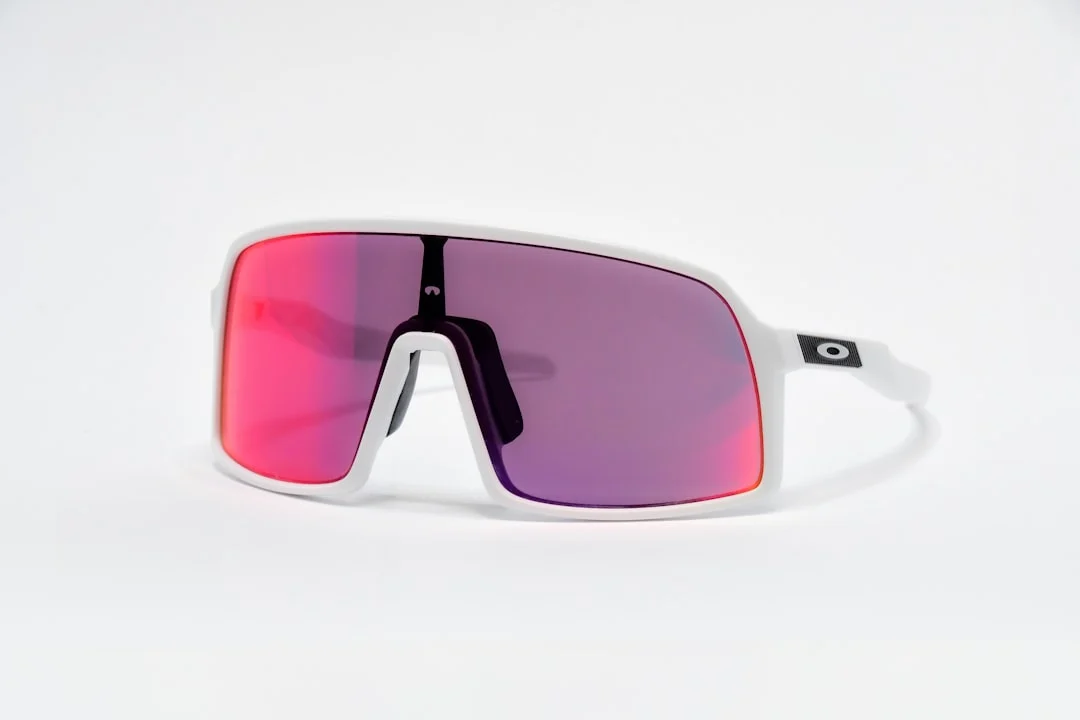
This guide is for small business owners, Etsy sellers, and anyone who needs professional-looking product images without a professional budget. Every technique here has been tested in real home studio setups, and most require nothing more than materials you already own or can buy inexpensively.
Understanding basic photography principles will help you get the most from this guide. If you are new to photography, consider reviewing Exposure Triangle and Photography Lighting for the foundational concepts that underpin product photography.
Setting Up a Home Product Photography Studio
You do not need a dedicated room. A stable table near a large window is your starting point. Clear the table completely and position it so the window light falls across the surface from one side. This single light source, combined with a reflector on the opposite side, creates professional lighting for most small to medium products.
For the backdrop, a large sheet of white poster board or foam core works perfectly. Curve it from the table surface up behind the product to create a seamless background with no visible horizon line. Tape the top edge to a wall or prop it against a box. This ‘sweep’ technique is used in professional studios worldwide.
A tripod is essential for product photography. It ensures consistency between shots, allows you to use slower shutter speeds in lower light, and frees your hands to adjust the product. Any stable tripod will work. Position the camera at the product’s eye level or slightly above for the most natural perspective.
| Equipment | Purpose | Budget Alternative |
|---|---|---|
| Seamless backdrop paper | Clean, distraction-free background | White poster board or foam core |
| Tripod | Consistent framing and sharp images | Stack of books with camera balanced on top |
| Reflector | Fill shadows opposite main light | White cardboard or aluminum foil on cardboard |
| Remote shutter release | Eliminate camera shake | Camera’s self-timer (2-second delay) |
| Light tent/box | Diffused, even lighting for small items | DIY from translucent storage bin |
Natural Light Product Photography
Natural light from a window is the most accessible and flattering light source for product photography. North-facing windows (in the Northern Hemisphere) provide consistent, soft light throughout the day because they never receive direct sunlight. For a deeper understanding of working with available light, see Natural Light Photography.
If your window gets direct sunlight, diffuse it. Hang a white bedsheet, frosted shower curtain, or thin white fabric over the window. This transforms harsh, directional sunlight into soft, wrapping light that minimizes harsh shadows and brings out product details.
Place a white reflector (foam core board works perfectly) on the opposite side of the product from the window. This bounces light back into the shadow side, reducing contrast and revealing detail in darker areas. Move the reflector closer for more fill or farther away for more dramatic shadows. Experiment with both to find what suits your product.
Building a DIY Light Box
A light box (also called a light tent) surrounds your product with diffused light from multiple directions. It is ideal for small, reflective, or glossy products that show distracting reflections with a single light source. Building one takes about 30 minutes.
- Start with a cardboard box large enough for your products, plus room around each side.
- Cut out the top and three sides, leaving roughly a two-inch border for structural strength.
- Tape white tissue paper or thin white fabric over each cutout to create diffusion panels.
- Place a white backdrop (poster board) inside, curved from the bottom to the back wall.
- Position lights outside each panel. Desk lamps with daylight-balanced bulbs work well.
- Shoot through the open front side. The diffused light wraps around the product evenly.
The result is even, shadow-free lighting that works beautifully for jewelry, glassware, small electronics, and any product where reflections would be distracting. For larger products, scale up the box or use the window-and-reflector method described above.
Achieving a Clean White Background
E-commerce platforms often require or strongly recommend a pure white background. Achieving this in-camera requires the background to be significantly brighter than the product. In practice, this means lighting the background separately from the product, which is easier than it sounds.
The simpler approach is to get the background close to white in-camera using a white sweep and good lighting, then finish the job in editing. Photograph with a slightly overexposed background, then use the levels or curves tool to push it to pure white. Photo Editing For Beginners covers these basic adjustments.
When editing, increase Exposure Compensation by about +0.5 to +1.0 stop during the shoot to keep the background bright. Watch your product to ensure it does not become washed out. If the product loses detail, expose for the product and fix the background in post-processing.
Lifestyle Product Photography
While white-background photos are essential for product listings, lifestyle shots show your product in context and help customers imagine using it. A ceramic mug looks like every other mug on a white background, but styled next to a book with steam rising in morning light, it tells a story.
Use Depth Of Field to separate your product from the background in lifestyle shots. A wide Aperture (f/2.8 to f/4) keeps the product sharp while gently blurring the environment. This draws the viewer’s eye to the product while maintaining context.
Style simply. A few props that relate to the product’s use are enough. A skincare product might sit on a marble surface with a plant and a towel. A kitchen tool might appear on a cutting board with fresh ingredients. Avoid clutter. Every element in the frame should support the product’s story.
Flat Lay Photography for Products
Flat lay photography, shot directly from above looking straight down, is popular for social media and works exceptionally well for flat or small products: clothing, stationery, food, cosmetics, and accessories. The bird’s-eye perspective creates a clean, organized composition.
Use the Rule Of Thirds to arrange items within the frame. Place the hero product at a power point and arrange supporting elements around it. Leave some negative space to avoid a cluttered look. For more on effective spacing, see our guide to Negative Space.
The biggest challenge with flat lays is getting the camera perfectly parallel to the surface. Even a slight angle distorts the geometry. Use a tripod with a horizontal center column, or mount your camera pointing straight down and compose on the live view screen.
Camera Settings for Product Photography
Product photography demands sharpness and accurate color. Shoot in Raw Vs Jpeg format for maximum editing flexibility. Set your white balance manually using a gray card or white sheet of paper. This ensures consistent color across your entire product catalog.
Use an Aperture between f/8 and f/11 for maximum sharpness across the product. This range falls in the ‘sweet spot’ for most lenses where optical quality peaks. If you need everything in focus from front to back, use f/11 to f/16, but be aware of Diffraction at very small apertures.
Keep Iso as low as possible (100 or 200) to minimize noise. With a tripod, you can use any Shutter Speed without worrying about camera shake, so there is no reason to push ISO higher. Use a two-second timer or remote release to prevent vibration from pressing the shutter button.
Smartphone Product Photography
Modern smartphones can produce excellent product photos when used correctly. The key limitations are the small sensor (which affects low-light performance and depth of field) and the fixed focal length. Work around these by ensuring abundant light and using portrait mode selectively.
Clean the lens before every session. Fingerprints on a phone lens create haze and reduce sharpness more than any other factor. Lock exposure and focus by tapping and holding on the product in the viewfinder. This prevents the camera from readjusting between shots, ensuring consistency.
Use the main camera (1x) rather than the ultra-wide for most products. The ultra-wide introduces distortion at the edges that makes products look warped. If you need to fill the frame, move the phone closer rather than using digital zoom, which degrades quality.
Editing Product Photos
Post-processing is where good product photos become great ones. At minimum, adjust white balance for accurate color, increase contrast slightly to make the product pop, and clean up the background. Our Photo Editing For Beginners guide covers the essential tools.
Color accuracy is critical. Your edited product photos should match the real product as closely as possible. Returns due to color mismatch cost far more than the time spent calibrating your monitor and adjusting colors carefully. Color Management Photography covers the fundamentals of consistent color.
Batch editing saves enormous time when photographing multiple products. Edit one image to perfection, then copy those settings to the rest of the batch. Consistency across your product catalog makes your brand look professional and trustworthy.
Building Visual Consistency for Your Brand
Consistency builds trust. When every product image on your website uses the same lighting style, background, and editing treatment, customers perceive professionalism. Inconsistent images, even if individually good, suggest a lack of attention to detail.
Create a style guide for your product photography. Document your setup (light position, backdrop color, camera height), camera settings, and editing steps. This ensures that photos taken weeks or months apart look like they belong to the same catalog.
Include the same types of shots for every product: a clean hero shot on white, a detail or close-up, a lifestyle or context shot, and scale reference if size is not obvious. This predictable set of images gives customers a complete view and reduces purchase uncertainty.
E-Commerce Platform Image Requirements
Different platforms have specific image requirements. Meeting or exceeding these ensures your products display properly and are eligible for features like zoom functionality.
| Platform | Minimum Size | Background | Format |
|---|---|---|---|
| Amazon | 1000 x 1000 px (2000+ recommended) | Pure white (RGB 255,255,255) | JPEG, PNG, TIFF, GIF |
| Etsy | 2000 x 2000 px recommended | Any (lifestyle encouraged) | JPEG, PNG, GIF |
| Shopify | 2048 x 2048 px recommended | Any | JPEG, PNG, GIF, WEBP |
| eBay | 500 x 500 px minimum | White or light gray preferred | JPEG, PNG |
| WooCommerce | 800 x 800 px minimum | Any | JPEG, PNG, GIF, WEBP |
Always shoot at your camera’s maximum resolution. You can always downsize, but you cannot upsize without losing quality. Saving the original files gives you flexibility to meet any platform’s requirements, current or future.
Common Mistakes in DIY Product Photography
- Using mixed lighting: Combining window light with tungsten desk lamps creates uneven color casts. Stick to one light source type.
- Cluttered backgrounds: Distracting elements behind your product undermine professionalism. Use a clean sweep or styled but simple setting.
- Inconsistent sizing and framing: Products should occupy similar proportions of the frame across your catalog.
- Over-editing: Heavy filters and excessive saturation misrepresent your product. Keep edits natural and accurate.
- Ignoring shadows: Harsh, dark shadows look unprofessional. Use reflectors to fill shadows or diffuse your light source.
- Forgetting scale: Without a reference, customers cannot judge size. Include a size reference photo in your listing.
Try This: Product Photography Exercises
- One Product, Five Angles: Photograph a single product from five different perspectives. Identify which angle shows it best.
- Window Light Comparison: Photograph the same product in direct window light, diffused window light, and with a reflector. Compare the shadow quality.
- DIY Light Box Test: Build a simple light box and compare results to your window setup. Note which products look better in each setup.
- Background Swap: Photograph one product on white, black, wood, and marble surfaces. See how background color affects the product’s perceived value.
- Phone vs. Camera: Photograph the same product with your phone and your camera using identical lighting. Compare the results to decide which tool serves your needs.
Frequently Asked Questions
Do I need a professional camera for product photography?
No. A smartphone with good lighting and proper technique can produce excellent product images. Lighting matters far more than the camera. If you outgrow your phone’s capabilities, an entry-level mirrorless camera with a basic kit lens is a solid upgrade.
What is the best light for product photos?
A large window with diffused natural light, supplemented by a white reflector on the opposite side, is the best starting point. It is free, produces flattering results, and requires no electrical setup. If you need to shoot at night or in windowless spaces, affordable LED panel lights work well.
How many photos should each product have?
Aim for at least four to six images per product: a hero shot, a back or alternate angle, a close-up of key details, a scale reference, and one or two lifestyle images showing the product in use.
How do I make the background pure white?
Light the background more brightly than the product, or photograph on a white sweep and push the background to pure white in post-processing using levels or curves adjustment. The editing approach is easier and more reliable for beginners.
How long does a product photo session take?
Once your setup is dialed in, plan about 10 to 15 minutes per product for simple items. Complex products with multiple angles or styled setups take longer. The first session always takes the most time as you establish your workflow.