Why Photographing the Northern Lights Is a Unique Challenge
The northern lights (aurora borealis) are one of nature’s most spectacular displays: curtains, ribbons, and waves of green, purple, and pink light dancing across the sky. Photographing them is a bucket-list experience for many photographers, but it comes with challenges you will not encounter in any other type of night photography. The aurora moves constantly, changes brightness by orders of magnitude within seconds, and appears in some of the coldest, most remote locations on Earth.
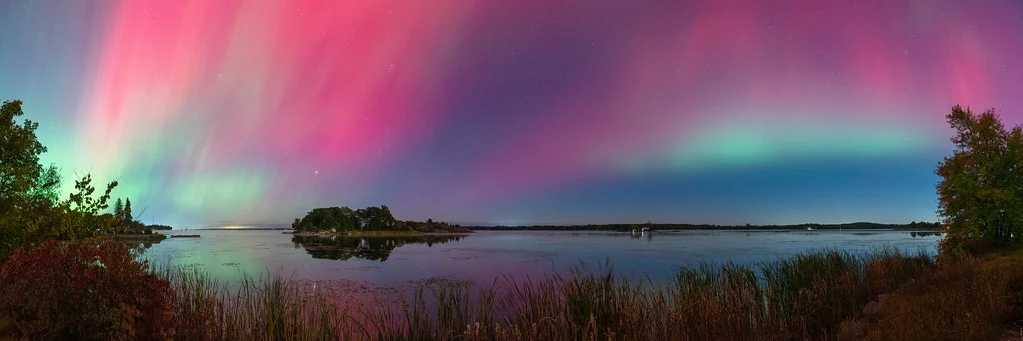
The good news: your camera can capture the aurora far more vividly than your eyes can see it. While the naked eye may see a faint green glow, a camera sensor accumulating light for several seconds reveals brilliant colors, intricate structures, and sweeping patterns that make the experience even more magical through the lens.
Core Camera Settings for Northern Lights
| Setting | Value | Why |
|---|---|---|
| Mode | Manual (M) | Auto exposure cannot handle the dark sky with bright aurora |
| Aperture | f/1.4 – f/2.8 (widest available) | Gather maximum light from the faint aurora glow |
| Shutter Speed | 5s – 15s (varies with aurora brightness) | Short enough to preserve aurora structure; long enough to gather light |
| ISO | 1600 – 6400 | Amplify the aurora’s light while managing noise |
| Focus | Manual, pre-focused on infinity or a distant landmark | Autofocus fails in the dark |
| White Balance | 3500K – 4500K (or Auto, adjust in post) | Preserves natural aurora colors; prevents orange or blue cast |
| Image Stabilization | OFF | Causes vibration on a tripod |
| Long Exposure NR | OFF | The dark frame delay wastes precious seconds during active aurora |
| File Format | RAW | Maximum flexibility for color and exposure adjustments |
Why Shutter Speed Varies So Much
Unlike stars (which are constant), the aurora changes brightness and speed continuously. A faint, slow-moving aurora might need 15 to 20 seconds to register well. A bright, fast-moving aurora substorm might overexpose at 8 seconds and needs 3 to 5 seconds to freeze its structure. You will adjust shutter speed throughout the night as the aurora’s intensity changes.
Start at 10 seconds, ISO 3200, widest aperture. Check the result on the LCD and histogram. If the aurora is overexposed (too bright, washed out colors), reduce to 5 to 8 seconds or lower ISO. If it is too faint, extend to 15 seconds or raise ISO.
Faster Shutter for Better Structure
During bright aurora displays, shorter exposures (3 to 8 seconds) produce more dramatic images because they “freeze” the aurora’s structure. Long exposures (15 to 20 seconds) blur the movement, turning sharp curtains and pillars into a vague green glow. When the aurora is active and bright, use the shortest shutter speed that produces adequate exposure. The fine structure and rays visible in short exposures are what make aurora photos truly spectacular.
Understanding Aurora Colors and Camera Capture
The aurora produces colors that your camera captures differently than your eyes perceive:
- Green (557.7nm): The most common aurora color, produced by oxygen atoms at 60 to 200 miles altitude. Your eyes see green well, and the camera captures it vividly. This is the color that defines most aurora photos.
- Purple/violet (391-427nm): Produced by nitrogen molecules. Often appears at the bottom edges of curtains. Your camera captures this more vividly than your eyes, especially at high ISO.
- Red (630nm): Produced by oxygen atoms at very high altitudes (above 200 miles). Appears during intense geomagnetic storms. Faint to the eye but can be dramatic in photos.
- Blue and pink: Produced by nitrogen at low altitudes. Often visible in photos even when your eyes see only green.
White balance significantly affects how these colors render. A cooler white balance (3500K to 4000K) tends to make the greens more vivid and the purples more pronounced. A warmer setting (4500K to 5000K) shifts the aurora toward yellow-green. Shoot RAW and experiment with white balance in post to find the rendering you prefer.
Focusing in the Dark
The same focusing challenges that affect all night photography apply to aurora photography, often made harder by extreme cold and gloved hands.
Pre-Focus During Twilight
Arrive at your shooting location before full darkness. Autofocus on a distant landmark (mountain, building, tree on the horizon) and switch to manual focus. Do not touch the focus ring for the rest of the night. This is the most reliable method.
Focus on a Bright Star or Planet
Switch to Live View, point at the brightest star or planet visible, zoom in to maximum magnification, and manually turn the focus ring until the star is the smallest, sharpest point. This method is described in detail in our star photography guide.
Tape the Focus Ring
Once you achieve focus, place a strip of gaffer tape across the focus ring and lens barrel to prevent accidental movement. In the dark, with cold fingers and thick gloves, it is easy to inadvertently bump the focus ring. Tape prevents this frustrating mistake.
Composition for Aurora Photos
The aurora fills a large portion of the sky, which makes composition both easier (the sky is interesting everywhere) and harder (it is tempting to point the camera up and ignore everything else).
Include a Foreground
Aurora photos with only sky are less compelling than those with a strong foreground. Include elements that ground the image: a mountain range, a frozen lake, a lone tree, a cabin, a lake with reflections, or a rocky shoreline. The foreground provides scale and context, transforming a sky photo into a complete landscape.
Reflections
Still water reflects the aurora beautifully, doubling the color and light in your image. Lakes, fjords, and calm ocean bays are ideal foregrounds during aurora season. Even small puddles can create effective reflections. This is one of the most powerful aurora composition techniques.
Vertical for Tall Displays
When the aurora reaches high into the sky (particularly during intense storms when it extends overhead), switch to vertical/portrait orientation to capture the full height of the display. Many of the most dramatic aurora photos are vertical compositions showing curtains stretching from the horizon to directly overhead.
Wide Angle for Panoramic Displays
Use your widest lens (14mm to 20mm) to capture sweeping aurora displays that stretch across the entire sky. If the aurora spans more than your lens can capture in a single frame, shoot a panoramic sequence (overlapping frames from left to right) and stitch them in post-processing.
Self-Portraits and People
Silhouettes of people watching the aurora add a human element that creates emotional connection. Have someone stand still in the foreground during the exposure. At 5 to 10 seconds, they will be sharp as long as they do not move. Use a brief flashlight burst during the exposure to light their face and clothing, or leave them as a silhouette for a more dramatic look.
Planning Your Aurora Photography Trip
When and Where
The aurora is visible in high-latitude regions: northern Scandinavia (Norway, Sweden, Finland), Iceland, northern Canada, Alaska, and (for aurora australis) southern New Zealand, Tasmania, and Antarctica.
The best months are September through March, when nights are long and dark. The equinox periods (September/October and March/April) historically see slightly more aurora activity due to favorable solar wind alignment.
Solar Activity Forecasting
Aurora activity correlates with solar activity, particularly solar wind speed, density, and magnetic field orientation. Check aurora forecasting websites and apps that show the Kp index (a measure of geomagnetic activity from 0 to 9):
- Kp 0-2: Very faint or no visible aurora. Not worth going out.
- Kp 3-4: Visible aurora at high latitudes. Good photographic opportunity.
- Kp 5-6: Strong aurora. Visible further south. Excellent photography conditions.
- Kp 7-9: Major geomagnetic storm. Aurora visible at unusually low latitudes. Spectacular displays with reds, purples, and overhead coverage.
Weather Considerations
Clear skies are essential. A beautiful Kp 7 storm is invisible behind clouds. Monitor weather forecasts and be prepared to drive to clear patches. Northern aurora destinations often have rapidly changing weather, and driving 30 to 60 minutes can take you from clouds to clear skies.
Moon Phase
A full moon brightens the sky and can wash out faint aurora displays. A new moon provides the darkest sky but also the darkest foreground. A crescent or quarter moon can actually help by providing gentle illumination for the foreground landscape while still allowing the aurora to dominate the sky. Plan your trip around the new moon for the strongest aurora capture, or during a crescent moon if foreground detail matters.
Dealing with the Cold
Aurora photography typically happens in extreme cold, from -10C to -40C (14F to -40F). Cold affects both your gear and your ability to operate it.
Battery Management
Cold drains batteries rapidly. A battery that lasts 500 shots in warm conditions might die after 100 in extreme cold. Carry 3 to 4 fully charged spare batteries and keep them warm in an inside jacket pocket. When one battery dies, swap it for a warm one and put the “dead” battery back in your pocket. It will often recover enough charge in the warmth to give you another 30 to 50 shots.
Camera Condensation
When you bring cold gear into a warm environment (car, cabin), condensation forms immediately on and inside the camera. This can damage electronics and fog the lens from the inside. Before going indoors, seal the camera in a ziplock bag or wrap it in a towel. Let it warm up gradually inside the sealed bag so condensation forms on the outside of the bag instead of on the camera.
Personal Comfort
You will be standing outside in extreme cold for hours. Dress in proper layers: moisture-wicking base layer, insulating mid-layer, windproof/waterproof outer layer. Use chemical hand warmers in your gloves and boots. Bring thin “liner” gloves for operating camera controls, with thick mittens over them when not adjusting settings. A hot beverage in an insulated thermos makes the wait more comfortable.
Time-Lapse Aurora Photography
The aurora’s movement is perfect for time-lapse video. Set your camera to shoot continuous frames at a fixed interval (every 5 to 10 seconds) using an intervalometer. After the session, combine the frames into a video (24 or 30 frames per second) to show the aurora’s movement dramatically accelerated.
For time-lapse, fix your settings (Manual mode, fixed ISO, fixed aperture, fixed shutter speed) to prevent exposure flickering between frames. If the aurora brightness changes dramatically over the course of the time-lapse, you may need to adjust ISO in steps, then smooth the exposure transitions in post with “deflicker” software.
Common Northern Lights Photography Mistakes
1. Exposures Too Long
A 30-second exposure blurs the aurora into a vague green smear, losing all the beautiful curtain and ray structure. During bright displays, use 3 to 8 seconds. Even during faint displays, 15 seconds is usually the maximum before structure is lost.
2. Not Adjusting Settings Throughout the Night
The aurora changes brightness constantly. Settings that work perfectly at one moment may overexpose or underexpose the next. Check your LCD and histogram every 5 to 10 minutes and adjust shutter speed and ISO as the aurora’s intensity changes.
3. Only Shooting to the North
While “northern lights” suggests looking north, strong aurora displays often extend overhead and even to the south. During intense storms, the aurora can fill the entire sky. Do not get locked into one direction. Turn around. Look straight up. Some of the most dramatic structures appear directly overhead.
4. Leaving Long Exposure Noise Reduction On
LENR takes a dark frame after every shot, doubling your capture time. During an active aurora display, every second counts. Turn LENR off and handle noise in post-processing. At ISO 1600 to 3200 with modern cameras, noise is very manageable.
5. Not Checking Focus Periodically
Temperature changes can cause focus to shift slightly as lens elements expand and contract. Check focus on a bright star every 30 to 60 minutes, especially if the temperature is dropping rapidly.
6. Missing the Best Moments While Chimping
Aurora displays can peak suddenly and unexpectedly. Spend more time watching the sky than reviewing images on your LCD. A spectacular substorm (rapid intensification) can last only 2 to 3 minutes. If you are staring at your screen, you will miss it.
Frequently Asked Questions
Can I see the aurora with the naked eye?
Yes, but it appears less vivid than in photographs. Your eyes are less sensitive to the green wavelength at low light levels, so a bright display may appear as a pale green or even grayish glow. The camera, accumulating light over several seconds, reveals brilliant greens, purples, and pinks that your eyes cannot perceive at that intensity. The experience of seeing the aurora with your own eyes is still magical, even if the visual is subtler than the photos.
What lens is best for aurora photography?
A wide-angle lens with a fast maximum aperture is ideal. 14mm f/2.8, 20mm f/1.4, or 24mm f/1.4 are popular choices. The wide angle captures the broad sweep of the aurora across the sky, while the fast aperture gathers enough light at reasonable shutter speeds and ISO. An f/1.4 lens lets you use lower ISO or shorter shutter speeds than an f/2.8 lens, producing cleaner images with sharper aurora structure.
Can I photograph the aurora with a phone?
Modern phones with “night mode” can capture the aurora, though the results are significantly inferior to a dedicated camera. The small sensor requires aggressive noise reduction that smears fine detail, and you have less control over settings. If your phone has a manual/pro mode, use ISO 1600 to 3200, 5 to 10 second exposure, and mount it on a tripod or stable surface. Results can be surprisingly decent for sharing on social media.
How do I photograph the aurora and stars together?
The same exposure that captures the aurora (5 to 15 seconds at f/1.4 to f/2.8, ISO 1600 to 6400) also captures stars. During faint aurora displays, stars are prominent in the background. During bright displays, the aurora’s light overpowers fainter stars. Both look good. For maximum star detail combined with aurora, use the shortest exposure that adequately captures the aurora.
Is the aurora visible every night in northern locations?
No. Aurora activity depends on solar wind conditions, which vary daily. Even in prime aurora destinations, there are many nights with no visible aurora. A week-long trip gives you the best chance of catching at least one good display. Check aurora forecasts and plan outdoor sessions for nights with higher predicted Kp index.
Try This: Practice Exercises
Exercise 1: Night Settings Rehearsal
Before your aurora trip, practice setting up your camera in the dark at home. Put on thick gloves, go outside at night, and set your camera to: Manual mode, f/2.8, 10 seconds, ISO 3200, manual focus. Do this 5 times until you can set these settings by feel without looking at the dials. During an active aurora display, fumbling with controls costs you precious shots.
Exercise 2: Shutter Speed Bracket
During an aurora display, quickly shoot the same composition at 5s, 10s, and 15s (adjust ISO to keep similar brightness). Compare the three frames on your computer. Notice how the shorter exposure preserves finer aurora structure while the longer exposure shows smoother, less defined curtains. This teaches you to match your shutter speed to the aurora’s activity level.
Exercise 3: Foreground Scouting
Before the aurora appears (or during a lull), use a flashlight or headlamp to scout and compose foreground elements. Take test shots of potential compositions at high ISO (for a quick preview) and evaluate which foreground element creates the strongest scene. When the aurora appears, you will be ready to shoot your best composition immediately rather than searching for one in the dark while the display peaks.
Related Resources
- Night Photography Hub – Complete guide to all night photography
- Night Photography Settings – Settings for all night scenarios
- How to Photograph Stars – Star and Milky Way techniques
- Astrophotography Guide – Advanced night sky photography
- How to Photograph the Moon – Lunar photography settings
- Understanding ISO – Managing noise at high ISO values
- White Balance Guide – Color accuracy for aurora photos
- Tripod Guide – Stability for cold-weather long exposures
- Composition Guide – Strengthen your aurora compositions