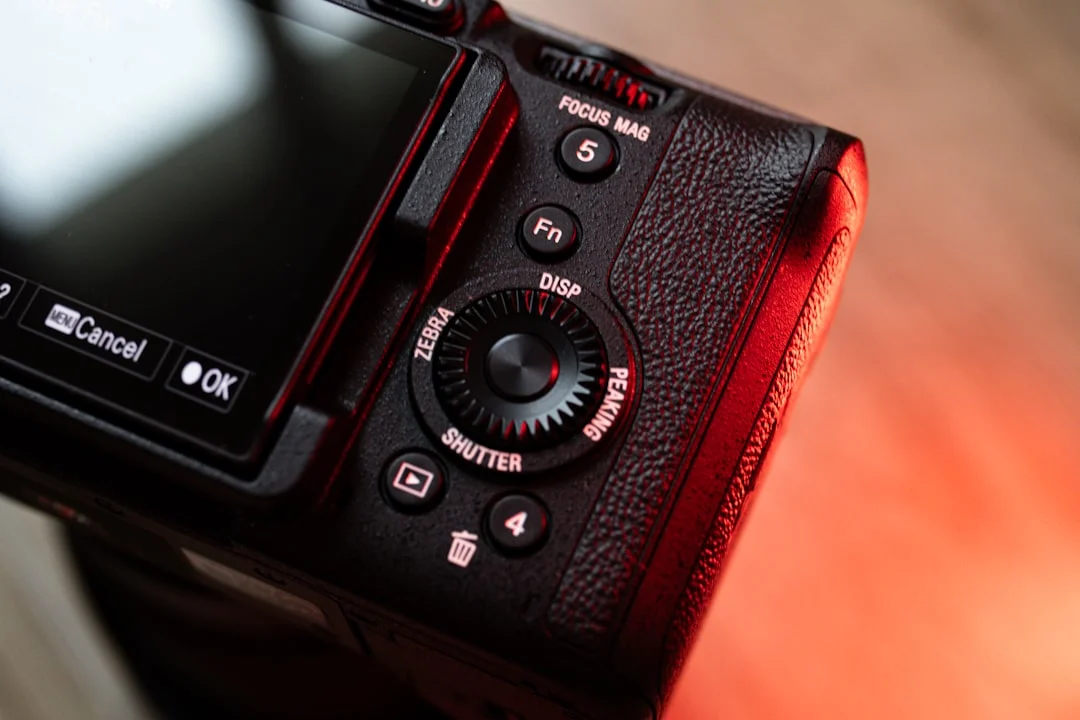
The main parts of a camera are the lens, the lens mount, the sensor, the shutter, the viewfinder, the rear screen, the shutter button, the mode dial, the command dials, the hot shoe, the memory card slot and the battery. The table below names each part, says where to find it and says what it does. The sections after it go through the camera by location: front, top, back, inside, then sides and base.
Camera parts and what they do
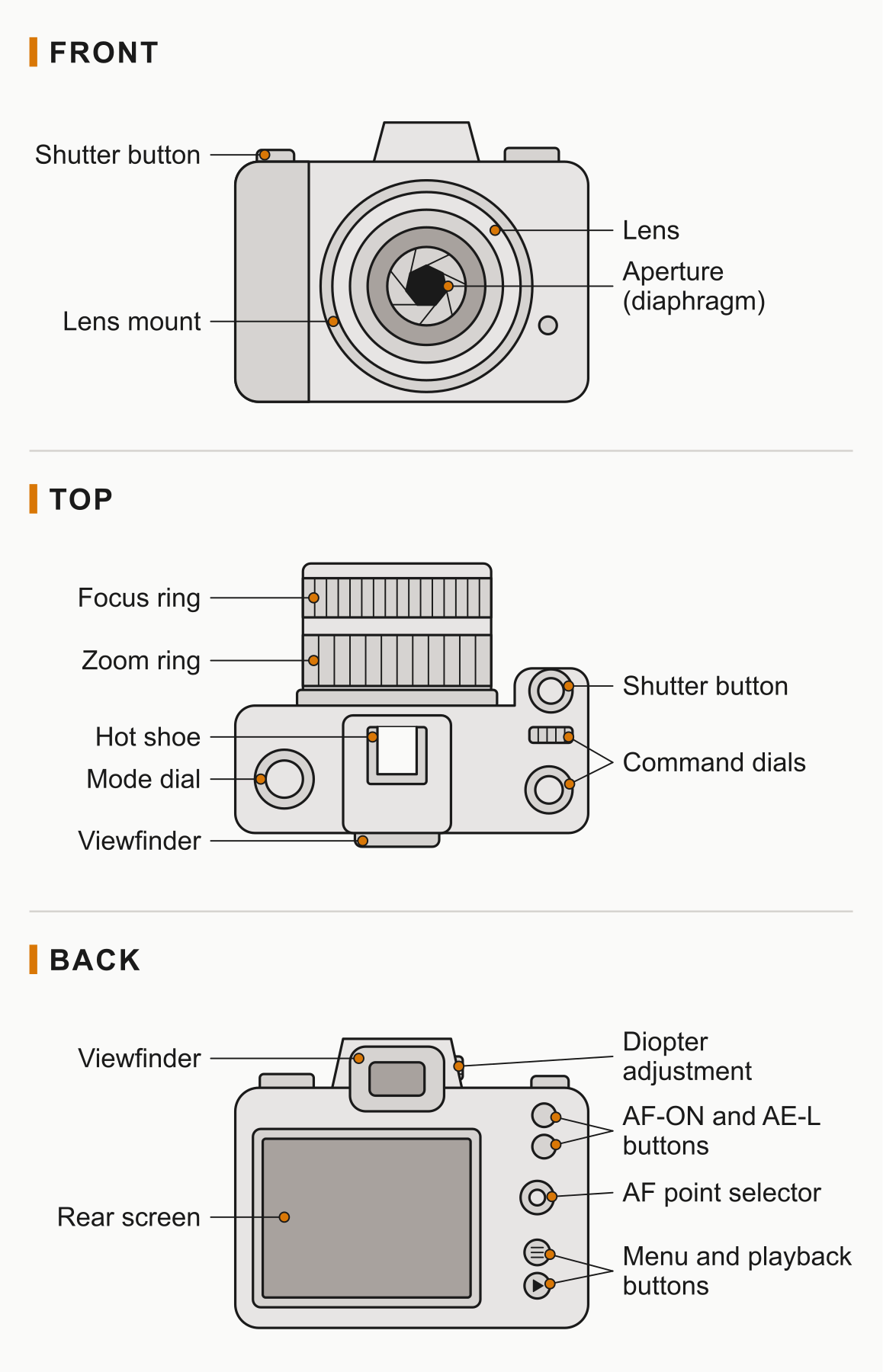
| Part | Where it is | What it does |
|---|---|---|
| Lens | Front, attached to the mount | Gathers light and focuses it onto the sensor. Sets the focal length and the widest aperture available. |
| Lens mount | Front of the body, the ring around the opening | Locks the lens to the body and, on most systems, passes power and data between them. A small release button beside it unlocks the lens. |
| Focus ring | Lens barrel | Sets focus by hand. On many lenses it also fine-tunes what autofocus chose. See focus modes. |
| Zoom ring | Lens barrel, on zoom lenses only | Changes the focal length, so the view gets wider or tighter. |
| Aperture (diaphragm) | Inside the lens | An adjustable opening made of overlapping blades. It controls how much light passes and how deep the sharp zone is. See aperture. |
| Lens hood | Front end of the lens | Shades the front glass from stray light. See lens hood. |
| Shutter button | Top of the grip, under your index finger | Half press to focus and meter, full press to take the picture. |
| Mode dial | Top of the body | Chooses who sets the exposure: you, the camera or a mix. See camera modes. |
| Command dials | Top and back, within reach of thumb and index finger | Change the setting the current mode needs, such as shutter speed, aperture or exposure compensation. |
| Hot shoe | Top centre of the body | A mount with electrical contacts for a flash, trigger or microphone. See hot shoe. |
| Viewfinder | Back, at the top, usually in the centre and on some bodies at the left corner, with a rubber eyecup | Lets you compose with the camera at your eye. Optical in a DSLR, a tiny screen in a mirrorless camera. |
| Diopter adjustment | Beside the viewfinder eyepiece, a small wheel or slider | Adjusts the viewfinder to match your eyesight so the display looks sharp. |
| Rear screen | Back of the body | Shows live view, menus and playback. It can show a histogram of the shot you just took. |
| AF point selector | Back, under your thumb (a joystick, pad or touch screen) | Moves the autofocus point to where your subject is. |
| AF-ON and AE-L buttons | Back, near the thumb rest (labels vary) | Start autofocus without the shutter button, and lock exposure. See back button focus and AE lock. |
| Menu and playback buttons | Back, beside the screen | Open the settings menus and review saved pictures. See camera menus. |
| Sensor | Inside, at the back of the chamber behind the mount | Records the light as an image. See how image sensors work. |
| Shutter | Inside, just in front of the sensor | Decides how long the sensor is exposed to light. See mechanical shutter. |
| Mirror (DSLR only) | Inside, behind the mount, angled at 45 degrees | Sends the lens image up to the optical viewfinder, then flips out of the way when you take the picture. |
| Pentaprism or pentamirror (DSLR only) | Inside the hump above the mount | Carries the image from the mirror to the eyepiece and corrects it, so the scene looks upright and the right way round. |
| Image processor | Inside the body | Turns the sensor’s signal into a picture file, runs autofocus calculations and drives the screen and menus. |
| Image stabilization | Inside the lens, the body or both, on cameras that have it | Shifts a lens element or the sensor to offset small hand movements. See image stabilization. |
| Memory card slot | Side of the body, or in the base beside the battery, behind a door | Holds the removable card the pictures are saved to. See memory cards. |
| Battery compartment | Base of the body or inside the grip | Holds the rechargeable battery. |
| Tripod socket | Underside, usually in line with the lens | A threaded hole that screws onto a tripod or plate. See how to use a tripod. |
| Ports | Side of the body, under a flap | Connect the camera to a computer, a monitor, a microphone or headphones. |
Front of the camera: lens, mount and release
The front is where light comes in. The lens bends it into an image, the mount holds the lens in place, and a small button beside the mount releases the lock so you can twist the lens off.
Inside the lens, several groups of glass elements work together to focus light and correct flaws such as chromatic aberration. The aperture is also in the lens. A wide opening gives a bright image and a shallow zone of sharp focus. A narrow opening does the opposite. The number of blades shapes the out-of-focus highlights, which is part of what gives a lens its bokeh.
The two rings on the barrel are the focus ring and, on a zoom lens, the zoom ring. Some lenses have switches for autofocus and stabilization, and a hood can fit on the front.
Wondering which numbers on a camera’s specification sheet matter? Understanding camera specifications goes through megapixels, sensor size, ISO range and autofocus points.
Top of the camera: the controls you use while shooting
The top holds the controls you reach for most. The shutter button sits on the grip, the mode dial or its equivalent on one side, and the command dials where your thumb and index finger fall naturally. Most bodies also put a hot shoe at the top centre.
The shutter button has two stages. A half press starts autofocus and takes a meter reading. A full press takes the picture. Pressing in one hard stab moves the camera, so squeeze gently.
The mode dial decides which exposure settings you control. In aperture priority you set the aperture and the camera picks the shutter speed. In shutter priority it is the other way round. In manual you set both. The command dials then change whatever the mode allows.
Want to set the aperture yourself and let the camera handle the shutter speed? Aperture priority mode covers how it works and when to use it.
Back of the camera: viewfinder, screen and buttons
The back is where you look and where you review. The viewfinder is a small window at the top, usually in the centre, with an eyecup that blocks side light. The rear screen takes up most of the rest. Some screens are fixed, some tilt, and some swing out and rotate, which helps with low and overhead angles.
If the viewfinder looks soft even when you are focused correctly, turn the diopter adjustment until the numbers or lines inside it look sharp. It is set to your eye, not to the lens.
The buttons around the screen vary between cameras, but a few jobs are common: picking the autofocus point, starting autofocus separately from the shutter button, locking exposure, opening the menus and playing back pictures. Many are configurable, so labels tell you the default job, not the only one.
Want your thumb to do the focusing? Back button focus shows how to set it up and why photographers separate focus from the shutter button.
Inside the camera: sensor, shutter, mirror and processor
The sensor sits at the back of the body, facing the mount. It is a grid of light-sensitive spots called photosites, and the number of them gives the megapixel count. A larger sensor collects more light for the same view, which is why sensor size separates camera classes. A stack of filters sits in front of it. One blocks infrared, and some cameras add a filter that softens the image slightly to prevent moire patterns. You never see these in use.
The shutter is in front of the sensor. In most cameras with interchangeable lenses, the mechanical shutter is two curtains that travel across the sensor: the first opens, the second closes, and the delay between them sets the exposure time. An electronic shutter does the same job by switching the sensor on and off electronically, with no moving parts, which is silent but on most sensors can bend fast-moving subjects. See rolling shutter for what that looks like.
Which shutter should you actually use? Mechanical vs electronic shutter compares the shutter modes in your menu and what each does to the picture.
The processor takes the sensor’s raw signal and builds a picture file from it, or saves the raw data for you to process yourself. It also handles autofocus calculations, burst shooting, video and the menus. The choice between saving a processed file or the raw data is covered in RAW vs JPEG.
Dust on the sensor shows up as dark spots, most visibly at small apertures.
Seeing dark spots in the same place on every picture? How to clean your camera’s sensor starts with confirming it is dust and works up from the gentlest method.
DSLR and mirrorless: which parts each one has
Both types share almost every part above. The difference is how the image gets from the lens to your eye. In a DSLR, a mirror reflects light up into a pentaprism or pentamirror and out through an optical viewfinder. When you press the shutter button, the mirror flips up so light can reach the sensor, and the view goes dark for a moment. A pentaprism is a solid glass block. A pentamirror does the same job with mirrors, and is usually lighter and a little dimmer. A mirrorless camera has neither. The sensor sees light all the time and shows it on a small screen inside the viewfinder or on the rear screen.
| Part | DSLR | Mirrorless |
|---|---|---|
| Mirror | Yes | No |
| Pentaprism or pentamirror | Yes | No |
| Optical viewfinder | Yes | No |
| Electronic viewfinder | No | Usually, though some bodies have only the rear screen |
| Sensor, shutter, processor | Yes | Yes, though some bodies have only an electronic shutter |
| Separate autofocus sensor | Usually, fed by a small secondary mirror | No, focusing is usually read from the main sensor |
| Live view on rear screen | On most, with the mirror locked up | Yes, always |
Trying to decide between the two designs? Mirrorless vs DSLR compares size, viewfinders, focusing and battery life side by side.
One result of the difference is what you see. An optical viewfinder shows the scene directly through the lens, so it cannot preview exposure. An electronic viewfinder shows what the sensor records, so brightness and white balance changes appear before you shoot.
Sides and base: ports, card slot, battery and tripod socket
The sides carry flaps covering the ports. Typical ones are a USB port for transfer and, on many cameras, charging, a video output, and sockets for a microphone and headphones on cameras made for video. The card slot door is on a side or in the grip, and cameras with two slots can record to both at once as a backup.
The battery usually lives in the base or grip. Batteries give fewer shots in the cold, so keep a spare warm in a pocket. The tripod socket is a threaded hole in the base, normally directly under the lens axis or close to it.
Common mistakes with camera parts
- Judging sharpness through a wrong diopter. A soft viewfinder is not always a soft picture. Fix: set the diopter until the information in the viewfinder looks crisp, then check focus on the rear screen at high zoom.
- Covering a sensor or window with a finger. A finger or strap across the lens front, a flash, or the autofocus assist light causes odd exposure and focus. Fix: check where your fingers fall each time you pick the camera up.
- Changing lenses with the body open to the air. The sensor or mirror box is exposed and dust gets in. Fix: turn the camera off, point the mount downward and be quick.
- Pressing the shutter button in one jab. It shakes the camera and skips the half press that sets focus. Fix: half press, wait for focus, then squeeze.
- Forgetting the card is the part that stores everything. A full or slow card stops a burst and a card that is not in the camera means no picture is saved. Fix: check the card and battery before you leave.
Try this: name every part in ten minutes
- Take your camera and lay the table above beside it.
- Find each external part by touch with your eyes closed, then open them and confirm.
- Take the lens off with the camera switched off and look in. On a DSLR you will see the mirror. On a mirrorless camera you will see the shutter or sensor. Do not touch either.
- Open the card and battery doors and find the tripod socket underneath.
- Turn the diopter while looking at the viewfinder information until it is sharp.
- Put the lens back on, set the smallest aperture (the largest f-number), look into the front of the lens and take a picture. You will see the blades close for an instant.
Frequently asked questions
What are the main parts of a camera?
The lens, the lens mount, the sensor, the shutter, the viewfinder, the rear screen, the shutter button, the mode dial, the command dials, the hot shoe, the memory card slot and the battery. The lens and sensor make the image. The other parts control it, show it or store it.
What are the parts inside a camera?
A sensor, a shutter of some kind and an image processor are inside almost every digital camera. A DSLR also has a mirror and a pentaprism or pentamirror. Many cameras have an image stabilization unit, and lenses contain glass elements and an aperture.
What is the body of a camera?
The body is the camera without the lens. It holds the sensor, shutter, processor, screen, controls, card slot and battery. The lens then attaches at the mount.
What does the mode dial do?
It chooses how the exposure is set. Auto and program let the camera decide, aperture priority and shutter priority share the decision, and manual leaves it all to you. The command dials then adjust the values.
What is the difference between the parts of a DSLR and a mirrorless camera?
A DSLR has a mirror and a pentaprism or pentamirror feeding an optical viewfinder. A mirrorless camera has neither and shows the sensor’s image on a screen or electronic viewfinder. Almost everything else is the same.