Lightning is one of the most dramatic and awe-inspiring subjects you can photograph. A single bolt illuminating a dark sky creates an image with raw, untamed energy that few other subjects can match. The challenge is obvious, lightning is unpredictable, fleeting, and potentially dangerous. But with the right approach to safety, timing, settings, and technique, you can capture jaw-dropping lightning photos that look almost too incredible to be real. This guide covers everything from storm safety to camera settings to post-processing, so you can chase storms with confidence.
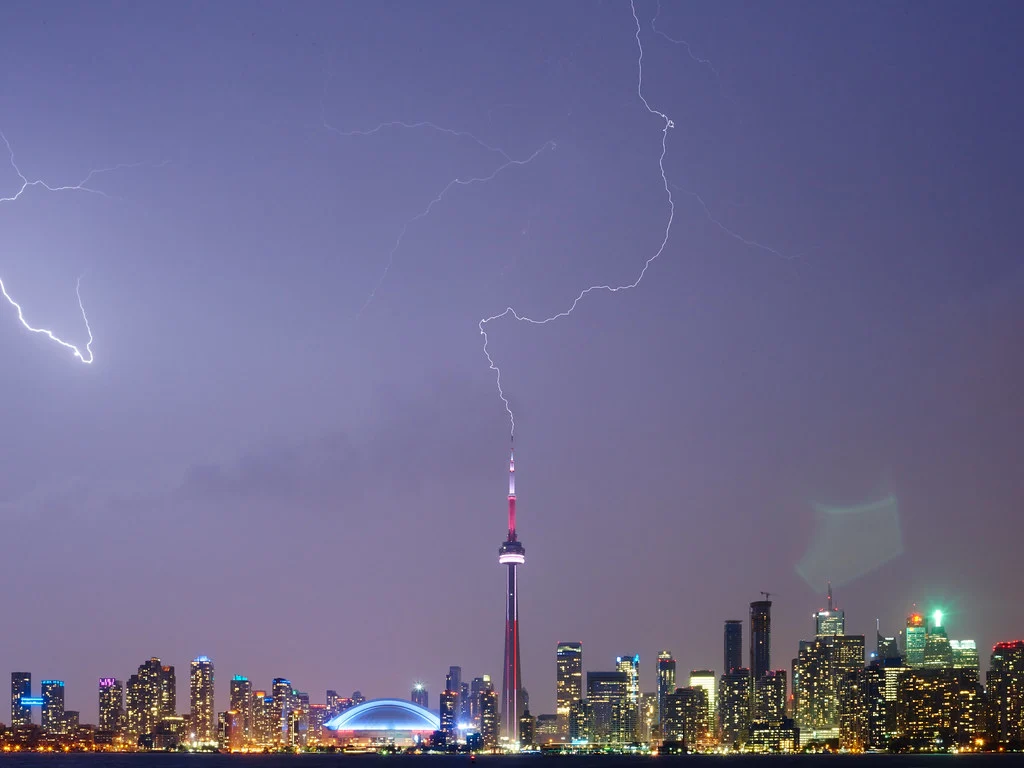
Safety First: Photographing Storms Responsibly
Before we discuss any settings or techniques, let us be direct about safety. Lightning kills people. It is not something to take lightly.
- Never photograph from an exposed position. Hilltops, open fields, and metal structures are extremely dangerous during a thunderstorm. Position yourself in a car, under a substantial shelter, or indoors near a window.
- Maintain safe distance. Stay at least 10 miles from the nearest lightning. If you can hear thunder clearly, you are close enough to be at risk. The “30/30 rule” states: if the time between seeing lightning and hearing thunder is less than 30 seconds, seek shelter immediately.
- Know the storm’s direction. Photograph storms moving toward you from a distance, or watch them pass perpendicular to your position. Never position yourself in the direct path of an approaching storm.
- Have an exit plan. Know exactly where you will go for shelter if conditions change rapidly.
- Do not use a metal tripod in an open area during an active storm overhead. Photograph from inside a car or building when the storm is close.
Essential Gear for Lightning Photography
- Camera with manual mode and Bulb setting: Any DSLR or mirrorless camera with full manual control of shutter speed, aperture, and ISO. Bulb mode lets you hold the shutter open for as long as you want, which is critical for nighttime lightning.
- Sturdy tripod: Long exposures are the foundation of lightning photography. Wind is common during storms, so you need a tripod that will not vibrate or blow over.
- Wide-angle lens (14-35mm): You cannot predict exactly where lightning will strike, so a wider field of view increases your chances of capturing a bolt. A 24mm or wider lens is ideal for covering a large portion of the sky.
- Lightning trigger (optional but powerful): Devices like the MIOPS or Pluto Trigger detect the flash of lightning and fire your shutter automatically within milliseconds. These are especially valuable for daytime lightning when long exposures are not possible.
- Remote shutter release: Lets you fire the shutter without touching the camera and is essential for Bulb mode exposures.
- Rain protection for your gear: A rain sleeve or plastic bag over your camera body, with just the lens front exposed, protects your gear from rain while you shoot.
Camera Settings for Lightning
Your camera settings depend heavily on whether you are shooting lightning at night or during the day. The approaches are quite different.
Nighttime Lightning Settings
Night is the easier scenario because you can leave the shutter open and wait for a bolt to fire during your exposure.
- Shooting mode: Manual or Bulb.
- Shutter speed: 10 to 30 seconds. Leave the shutter open long enough that lightning has a good chance of striking during the exposure. If the storm is active with frequent bolts, 10 seconds may be enough. For less active storms, use 20 to 30 seconds or Bulb mode.
- Aperture: f/5.6 to f/11. Start at f/8. If the bolts are very bright and overexposing, stop down to f/11 or f/14. If they are faint and distant, open up to f/5.6.
- ISO: 100 to 400. Keep it low to avoid overexposing the lightning and to minimize noise in the dark sky.
- Focus: Manual focus set to infinity or focused on a distant object. Lightning is far away, so infinity focus works perfectly.
Daytime Lightning Settings
Daytime lightning is much harder because you cannot use long exposures, the bright sky would overexpose completely. You have two options:
- Lightning trigger method: Use a trigger device with normal daytime settings (ISO 100, f/8, 1/250 second or appropriate for the ambient light). The trigger detects the bolt and fires the shutter within milliseconds. This is the most reliable daytime technique.
- ND filter method: Use a strong ND filter (10-stop) to artificially darken the scene, allowing you to use multi-second exposures in daylight. Settings might be ISO 100, f/16, 2 to 8 seconds with the ND filter. This brings your technique closer to the nighttime approach.
- Burst mode method (least reliable): Set your camera to continuous high-speed shooting, point it at the most active area, and hold down the shutter. You are essentially gambling that a bolt fires during one of your frames. This produces many throwaway images but occasionally captures lightning.
Step-by-Step Technique
- Track the storm. Use a weather radar app to monitor approaching thunderstorms. Identify which direction the storm is moving and where the most active lightning is occurring. Position yourself where you can see the storm at a safe distance.
- Choose a safe, sheltered location. A covered porch, parking garage opening, or the interior of your car are all good options. Make sure you have a clear view of the storm from your shelter.
- Set up your tripod and frame your shot. Aim at the area of the sky where lightning has been most active. Include landscape elements below the storm, a city skyline, an open plain, a body of water, to give the lightning context and scale.
- Dial in your settings. For nighttime: start at ISO 200, f/8, and 15-second exposures. For daytime: use a lightning trigger or ND filter as described above.
- Start shooting continuously. At night, take back-to-back long exposures. The more frames you capture, the more likely you are to have lightning in some of them. A remote release with a locking feature makes this effortless.
- Adjust as you go. Review your captures. If the lightning is overexposed (thick white bolts with no internal detail), narrow the aperture or lower the ISO. If the bolts are faint, open up or increase ISO. If you are not capturing any lightning, try a wider field of view or aim at a different section of the sky.
- Shoot through the entire storm. Lightning activity changes throughout a storm’s lifecycle. Some of the most dramatic bolts come just before or just after the heaviest rain. Stay patient and keep shooting as long as it is safe to do so.
Composition Tips
- Include the landscape. Lightning against a plain dark sky is impressive, but lightning over a city skyline, mountain range, or open desert tells a story. Use the lower third of your frame for ground elements.
- Shoot wide and crop later. You cannot predict where the next bolt will strike. A wider lens captures more of the sky, giving you the best chance of including lightning in your frame. Crop in post for tighter compositions.
- Use vertical and horizontal orientations. Tall, vertical bolts from cloud to ground suit portrait orientation. Sprawling cloud-to-cloud lightning spreads across the sky and works better in landscape format.
- Watch for reflections. Lightning reflected in water, wet roads, or windows doubles the visual impact.
- Capture the storm structure. The clouds themselves, anvil tops, shelf clouds, wall clouds, are dramatic subjects that complement the lightning. Compose to include both the bolts and the storm’s structure.
Common Mistakes to Avoid
- Compromising your safety for a photo. No photograph is worth risking your life. If conditions become dangerous, pack up immediately. You can always shoot the next storm.
- Exposures that are too long. While longer exposures increase your chance of capturing lightning, exposures over 30 seconds often introduce too much ambient light (especially with any city glow or moonlight), making the sky look washed out and gray instead of dark and dramatic.
- Overexposing the bolts. Very bright, close lightning can blow out completely, turning into a featureless white streak. If your early captures show this, reduce ISO and narrow the aperture.
- Not checking the histogram. The contrast between lightning and dark sky makes the LCD preview misleading. Use the histogram to ensure your highlights are not clipping.
- Giving up too early. Lightning photography requires patience. You might shoot for an hour before capturing a great bolt. Set up, settle in, and let the storm perform on its own schedule.
- Forgetting rain protection. Storms bring rain, often suddenly. Have your rain sleeve or plastic bag ready to deploy at a moment’s notice. Moisture inside your camera is an expensive mistake.
Post-Processing Tips
- Boost contrast. Increase the contrast between the bright lightning and the dark sky to make the bolts pop. The Contrast and Blacks sliders in Lightroom work well for this.
- Adjust white balance for mood. Cool blue tones emphasize the stormy atmosphere, while warmer tones can highlight the energy of the lightning. Experiment with different color temperatures to find the mood you prefer.
- Recover bolt detail. If the lightning is slightly overexposed, pull the Highlights slider down to recover internal detail and branching structure within the bolt.
- Sharpen the bolts selectively. Apply sharpening using a brush or mask just to the lightning and landscape, avoiding the sky where sharpening would amplify noise.
- Stack multiple strikes. If you captured several bolts from the same composition, layer them in Photoshop using the Lighten blending mode to create an image with multiple bolts illuminating the sky. Make sure all frames were shot from the same tripod position.
- Reduce noise in the sky. Long exposures in warm weather generate sensor noise. Use luminance noise reduction on the sky while preserving sharpness in the lightning and foreground.
Frequently Asked Questions
What camera settings are best for lightning at night?
Start with ISO 100 to 200, aperture f/8, and a shutter speed of 15 to 30 seconds. The long exposure gives lightning time to strike during your frame. Adjust the aperture based on bolt brightness, stop down if they are overexposed, open up if they are too faint. Take continuous back-to-back exposures to maximize your chances.
Can I photograph lightning during the day?
Yes, but it requires different technique. Use a lightning trigger device that detects the flash and fires your camera automatically, or use a strong ND filter (10-stop) to allow multi-second exposures in daylight. Without these tools, you are left with burst mode and luck. Daytime lightning photos can be spectacular because the bolts are visible against dramatic, textured storm clouds.
How far away should I be from lightning to photograph it safely?
Stay at least 10 miles from the nearest lightning. If you can count fewer than 30 seconds between a flash and its thunder, the lightning is within 6 miles and you should seek solid shelter immediately. Photograph from inside a building or car when storms are nearby. Many stunning lightning photos are captured from distances of 20 to 50 miles using telephoto lenses.
Do I need a special trigger for lightning photography?
For nighttime lightning, no, long exposures are the standard technique and work very well. For daytime lightning, a trigger is highly recommended because you cannot use long exposures in bright light without ND filters. Triggers like MIOPS and Pluto detect the electromagnetic pulse or light flash from a bolt and fire your camera within milliseconds. They significantly increase your success rate.
Why are my lightning photos blurry?
The most likely cause is camera movement during the long exposure. Make sure your tripod is stable, use a remote shutter release, and turn off image stabilization when the camera is tripod-mounted. Wind buffeting the camera is another common cause, weight down your tripod or shield it from the wind. Also check that your manual focus is set correctly to infinity.
Continue Learning
Lightning photography shares core techniques with other night photography and long exposure disciplines. Explore these related guides: