Photos look grainy when the camera has to amplify a weak signal from its sensor, which shows up as tiny speckles called noise. The usual causes are a high ISO setting in low light, a photo that was taken too dark and brightened later, a small sensor such as a phone’s, heavy cropping or digital zoom, and editing that lifts shadows or sharpens too hard. The fixes are to give the camera more light, keep ISO as low as the situation allows, get the exposure right in the camera, and use gentle noise reduction afterward.
Grain is one of the first things beginners notice when they look closely at their photos, especially ones taken indoors or at night. The good news is that you have more control over it than you might think, and a little grain is far less of a problem than it looks when you zoom in on a screen.
This page explains what grain is, the most common causes, what to do about each one when you are taking the picture, and how to clean it up afterward without making the photo look like plastic.
What “grainy” really means
In digital photography, the speckled look people call grain is properly called noise. It comes in two kinds:
- Luminance noise: light and dark speckles, a bit like sand. It looks most like the grain of old film. See luminance noise.
- Color noise: random red, green and blue blotches, most visible in dark, smooth areas like a night sky. It usually looks worse and is easier to remove. See color noise.
Why does it happen? A camera sensor is covered in millions of tiny light collectors. Light does not arrive in a perfectly smooth stream; it arrives as tiny packets, a bit like raindrops. In bright light, so many drops land on each collector that the small random differences do not show. In dim light, only a few drops land, so the random differences between neighbors become visible. The electronics in the camera also add a small amount of their own noise. When the signal is weak, all of that randomness shows up as grain.
The key idea to take away: noise comes from too little light reaching the sensor. Almost every fix is a way of getting more light in, or of not making a weak signal look brighter than it is.
Film photographers talk about film grain, which comes from the tiny crystals in film. It looks different from digital noise, and many people like it. Digital noise is what this page is mostly about.
Cause 1: a high ISO setting
ISO controls how much the camera amplifies the signal from the sensor. Low numbers like 100 or 200 mean little amplification and clean photos. High numbers like 3200 or 6400 mean a lot of amplification, and more visible noise.
Cameras raise the ISO automatically indoors, in the evening and at night, because they need to keep the shutter speed fast enough to avoid blur. That is a sensible choice. The noise is the price you pay for a sharp, bright photo.
What to do:
- Add light. Move closer to a window, turn on lamps or shoot earlier in the evening. More light lets the camera choose a lower ISO.
- Open the aperture. A smaller f-number, like f/1.8 or f/2.8, lets in more light so the ISO can stay lower. What aperture is explains how it works.
- Use a tripod for still subjects. With the camera on a support, you can use a slower shutter speed and a low ISO. Landscapes, buildings and night cityscapes are perfect for this.
- Set a sensible ISO limit. If you use Auto ISO, many cameras let you set a maximum. Set it to the highest value whose results you are happy with.
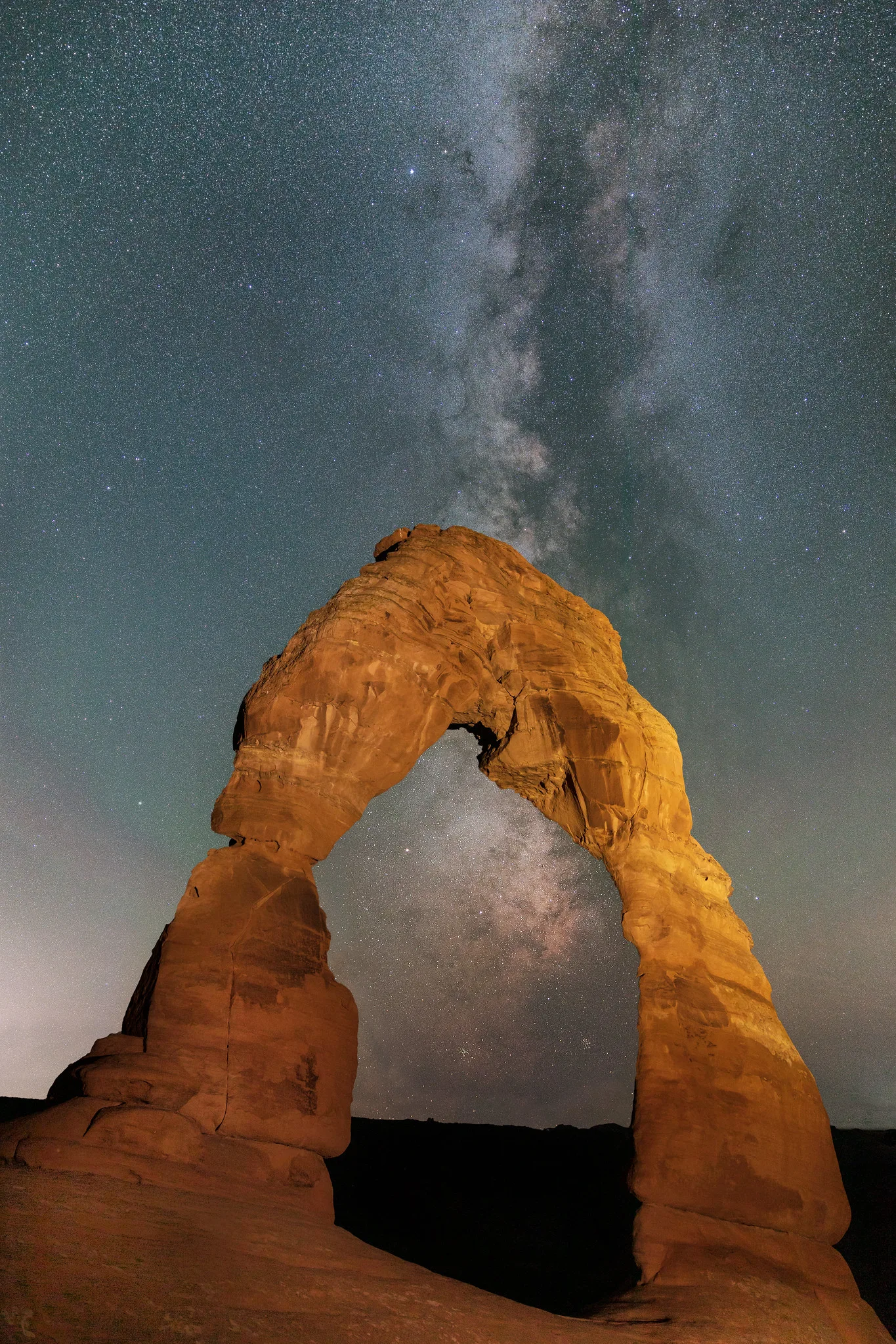
Do not be scared of high ISO, though. A grainy but sharp photo of a great moment is better than a clean but blurry one. The milky way photo above was taken at ISO 3200, because there was no other way to collect enough starlight in a short exposure. The noise was cleaned up a little afterward.
Not sure how ISO trades off against the other two settings? The exposure triangle shows how shutter speed, aperture and ISO work together.
Cause 2: the photo was too dark and brightened later
This one surprises many people. You take a photo at a low ISO to avoid noise, but it comes out dark. Then you brighten it in editing, and it turns out grainier than if you had used a higher ISO in the first place.
The reason is that brightening a dark photo is just amplifying a weak signal, which is exactly what raising ISO does. The sensor still collected too little light. Doing the brightening in software rather than in the camera often makes things worse, especially with JPEG files.
What to do: get the brightness right when you take the photo. Use exposure compensation to brighten the shot if it looks dark, and check the histogram. If your photos are often dark, the guide on why photos come out dark walks through every cause.
Cause 3: a small sensor
The sensor is the chip that records your photo. Phones and small compact cameras have tiny sensors, so each light collector on them is tiny too and catches less light. That makes them noisier in dim conditions than cameras with larger sensors. The page on sensor size explains the difference.
Phones are very clever at hiding this. They take several photos in a fraction of a second and blend them together, which averages out the noise. That is why phone photos in a dark room can look smooth but also a little smudgy or painted.
What to do with a phone:
- Use the phone’s night mode in dark places, and hold still until it finishes.
- Rest the phone on something solid, or use a small phone tripod, so night mode can use longer exposures.
- Avoid the digital zoom (see below).
- Find more light. Phones do best when the light is good.
The guide on night photography with your smartphone has more phone-specific tips.
Cause 4: digital zoom and heavy cropping
When you pinch to zoom past a phone’s built-in lenses, or crop a small section out of a photo, you are enlarging a small part of the image. The noise gets enlarged along with everything else, so a photo that looked clean as a whole suddenly looks grainy.
What to do: walk closer instead of zooming in. If your phone has more than one lens, use the closest optical option, often marked 2x, 3x or 5x, and stop there. When cropping, try to frame tighter in the camera next time so you need to crop less.
Cause 5: long exposures and heat
Very long exposures, of several seconds or more, and hot weather both add a different kind of noise. You may see bright colored dots called hot pixels, or a slightly blotchy look in dark areas. Sensors also warm up when you shoot lots of long exposures or video in a row.
What to do: turn on long exposure noise reduction if your camera has it. After each long exposure, the camera takes a second, black frame of the same length and subtracts the hot pixels. It doubles the waiting time, but it works well. The page on long exposure noise reduction explains it. Giving the camera a break between long exposures helps too.
Cause 6: editing that brings noise out
Some editing moves make noise more visible, even in a photo that looked fine:
- Lifting the shadows a lot. Dark areas hold the most noise. Brightening them shows it.
- Heavy sharpening. Sharpening makes edges crisper, but it treats noise speckles as tiny edges too. See sharpening.
- Strong clarity, texture or “structure” sliders. These boost fine detail, including grain.
- Lots of saturation. Boosting color can make color noise much more obvious.
What to do: make these adjustments gently and zoom in to check. When you lift shadows, add a touch of noise reduction at the same time.
How to reduce noise in editing
Almost every editing app has a noise reduction tool. On computers it is often in a “detail” panel. On phones it may be called “noise reduction” or “smooth”. The full guide to noise reduction goes into each slider, but here is a simple beginner method.
- Zoom in to 100 percent on a dark, smooth area such as a sky or a shadow.
- Remove color noise first. Many apps already apply some. Raise the color noise slider until the colored blotches turn into plain gray speckles. Stop there.
- Then reduce luminance noise gently. Raise it slowly. Stop as soon as the speckles look softer but before skin, fabric or leaves start to look waxy.
- Zoom back out. Look at the whole photo at a normal size. What looked bad at 100 percent is often invisible on a phone screen or a print.
Many editing apps now include a smarter denoise feature that uses machine learning, which is a type of software trained on huge numbers of photos. It can clean up high ISO photos remarkably well. AI noise reduction explains how it works and when to use it.
Shooting in RAW helps a lot here. A RAW file keeps all the information the sensor recorded, so noise reduction has more to work with than it does with a JPEG, where the camera has already made choices for you.
When grain is fine, or even good
It is easy to become obsessed with noise. Try to keep it in perspective:
- People look at the whole photo. Nobody viewing your picture on a phone or a wall will zoom to 100 percent.
- Moment beats cleanliness. A noisy photo of a real laugh, a goal or a shooting star beats a clean photo of nothing.
- Black and white hides noise well. Converting a noisy color photo to black and white often makes the grain look natural and filmic.
- Some people add grain on purpose. A light grain can make digital photos feel softer and more like film. See how to add film grain to digital photos.
A quick checklist for low light
Before you take a photo somewhere dim, run through these questions in order. Each one is a way of getting more light to the sensor, so the camera can keep the ISO down.
- Can I add or move toward light? A window, a lamp or a brighter corner of the room is the best noise fix there is.
- Is my aperture as wide as it goes? Turn to the smallest f-number your lens allows if you do not need lots of depth.
- Is my subject still? If yes, brace the camera or use a tripod and let the shutter speed get slower.
- Is the exposure right? Check the histogram, and brighten in the camera rather than later.
- Is the ISO now as low as it can be? Only after the first four steps should you accept a higher ISO, and when you do, accept it happily.
Where noise shows the most
Noise is most visible in smooth, dark or evenly colored areas: night skies, shadows under furniture, dark clothing and plain walls. It hides in busy textures like leaves, gravel and patterned fabric. If you must use a high ISO, a composition with more texture and fewer big dark areas will look cleaner. Exposing so that the main subject is bright and well lit also helps, because the darkest parts of the frame are where speckles gather.
Common mistakes
- Keeping ISO low no matter what. This leads to blurry or dark photos. Raise ISO when you need to.
- Underexposing to avoid noise. Brightening a dark photo later usually adds more noise than shooting brighter at a higher ISO.
- Using digital zoom. Walk closer instead.
- Too much noise reduction. Faces turn waxy and grass turns into green mush. Use the least that looks acceptable at normal viewing size.
- Judging photos only at 100 percent. Check at the size people will actually see the photo.
- Forgetting to lower ISO after a night shoot. Next morning’s daylight photos come out grainy for no reason. Reset it, or use Auto ISO.
Try this: a 10-minute ISO test
This quick test shows you how much noise your own camera or phone makes, so you know which ISO values you are happy to use.
- Minutes 1 to 2: Find a dim room with an interesting object, like a bookshelf or a plant. Put the camera on a table or tripod.
- Minutes 3 to 6: Take the same photo at ISO 100, 400, 1600, 3200 and 6400, letting the camera adjust the shutter speed in aperture priority. On a phone, try a pro or manual mode if it has one, or compare normal and night modes.
- Minutes 7 to 8: Open the photos on a computer or tablet. Look at them at full screen, then zoom in to 100 percent on a dark area.
- Minutes 9 to 10: Decide the highest ISO where the noise still looks acceptable to you at full screen. Write it down. That is your personal ISO limit for now.
Many beginners are pleasantly surprised by how high they can go.
Frequently asked questions
Why are my photos grainy in good light?
Check the ISO. It may have been left high from an earlier shoot. Also check that you are not using digital zoom or cropping a tiny part of the photo.
Why are my indoor photos grainy?
Indoor light is much dimmer than it looks, so the camera raises the ISO. Move closer to a window, turn on more lights or use a wider aperture.
Why are my night photos grainy?
Night means very little light, so the camera uses a high ISO. Put the camera on a tripod and use a longer shutter speed with a lower ISO for still scenes.
What ISO is too high?
It depends on your camera. Larger sensors handle higher ISO better. Do the 10-minute test above to find the limit you are happy with on your own gear.
Can I fix grainy photos?
Yes, to a point. Noise reduction in any editing app can smooth it out, and newer machine-learning tools work very well. Use it gently so detail is not lost.
Is grain the same as blur?
No. Grain is speckles on top of the picture. Blur is when edges are soft or smeared. A photo can be sharp and grainy, or clean and blurry.
Photos clean now, but soft or smeared? How to take sharp photos tackles blur cause by cause.